| .github/workflows | ||
| __tests__ | ||
| img | ||
| src | ||
| .editorconfig | ||
| .eslintignore | ||
| .eslintrc | ||
| .gitignore | ||
| .npmrc | ||
| esbuild.config.mjs | ||
| jest.config.ts | ||
| LICENSE | ||
| manifest.json | ||
| package-lock.json | ||
| package.json | ||
| README.md | ||
| styles.css | ||
| tsconfig.json | ||
| version-bump.mjs | ||
| versions.json | ||

Checkbox Sync


English
Description
Checkbox Sync is a plugin for Obsidian that automates the management of checkbox states in your notes. If all child checkboxes are checked, the plugin automatically checks the parent checkbox, and if at least one of them is unchecked, it unchecks the parent.
Supported Lists
The plugin works with both ordered and unordered lists:
- Unordered Lists - Lists created with
-,+or*markers - Ordered Lists - Numbered lists (1., 2., etc.)
The plugin respects list indentation, allowing for nested checkbox hierarchies at any level.
Settings
The plugin offers the following configuration options:
- X-Only Mode - When enabled, only checkboxes marked with 'x' are considered checked. When disabled, any character inside the checkbox (except space) marks it as checked.
Usage
After activating the plugin, it automatically tracks checkboxes in your notes. Example usage:
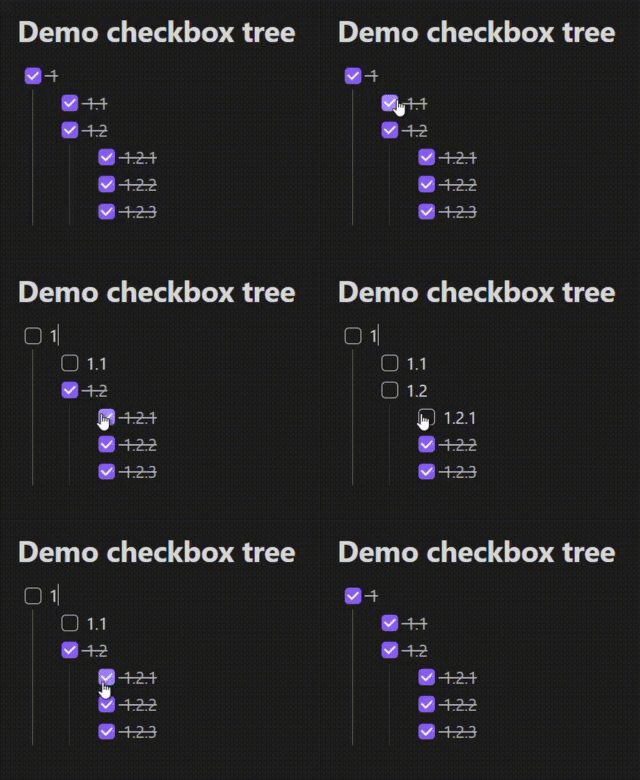
In this example, as soon as both child checkboxes are checked, the plugin will automatically check the parent checkbox. If at least one child checkbox is unchecked, the parent will be unchecked.
Installation
Manual Installation
- Go to the releases page and download the latest plugin archive.
- Extract the archive to the directory:
<your-vault>/.obsidian/plugins/checkbox-sync - Restart Obsidian.
- Open Settings → Community plugins and enable Checkbox Sync.
Installation via Plugin Manager (if supported)
- Open Obsidian and go to Settings → Community plugins.
- Click the Browse button, search for "Checkbox Sync", and install it.
- Enable the plugin after installation.
Development and Contribution
If you want to make changes or improvements to the plugin:
- Fork the repository.
- Create a new branch:
git checkout -b feature/feature-name - Make changes and commit:
git commit -m "Description of changes" - Push changes to your fork:
git push origin feature/feature-name - Open a Pull Request in the original repository.
License
This project is licensed under the 0BSD license.
Acknowledgments
- Obsidian — a platform for creating and organizing notes.
- The project is based on the obsidian-sample-plugin template.
If you have any questions, suggestions, or find a bug, please create an issue in the repository.
Русский
Описание
Checkbox Sync — это плагин для Obsidian, который автоматизирует управление состоянием чекбоксов в ваших заметках. Если все дочерние чекбоксы выполнены, плагин автоматически отмечает родительский чекбокс, а если хотя бы один из них не отмечен — снимает отметку с родительского.
Поддерживаемые списки
Плагин работает как с нумерованными, так и с ненумерованными списками:
- Ненумерованные списки - Списки, созданные с помощью маркеров
-,+или* - Нумерованные списки - Списки с цифровой нумерацией (1., 2. и т.д.)
Плагин учитывает отступы списков, позволяя создавать вложенные иерархии чекбоксов на любом уровне.
Настройки
Плагин предлагает следующие параметры конфигурации:
- Режим X-Only - Когда включен, только чекбоксы, отмеченные символом 'x', считаются выполненными. Когда отключен, любой символ внутри чекбокса (кроме пробела) считается отметкой о выполнении.
Использование
После активации плагина, он автоматически отслеживает чекбоксы в ваших заметках. Пример использования:
В данном примере, как только оба дочерних чекбокса будут отмечены, плагин автоматически отметит родительский чекбокс. Если хотя бы один дочерний чекбокс не отмечен, родительский сбросится.
Установка
Ручная установка
- Перейдите на страницу релизов и скачайте последний архив плагина.
- Распакуйте архив в директорию:
<ваше-хранилище>/.obsidian/plugins/checkbox-sync - Перезапустите Obsidian.
- Откройте Настройки → Плагины сообщества и активируйте Checkbox Sync.
Установка через менеджер плагинов (если поддерживается)
- Откройте Obsidian и перейдите в Настройки → Плагины сообщества.
- Нажмите кнопку Обзор, найдите "Checkbox Sync" и установите его.
- Активируйте плагин после установки.
Разработка и вклад
Если вы хотите внести изменения или улучшения в плагин:
- Форкните репозиторий.
- Создайте новую ветку:
git checkout -b feature/имя-функционала - Внесите изменения и сделайте коммит:
git commit -m "Описание изменений" - Отправьте изменения в свой форк:
git push origin feature/имя-функционала - Откройте Pull Request в оригинальном репозитории.
Лицензия
Этот проект лицензирован под лицензией 0BSD.
Благодарности
- Obsidian — платформа для создания и организации заметок.
- Проект создан на основе шаблона obsidian-sample-plugin.
Если у вас есть вопросы, предложения или вы обнаружили баг, пожалуйста, создайте issue в репозитории.