mirror of
https://github.com/rioskit/obsidian-todo-txt-mode.git
synced 2026-07-22 05:49:24 +00:00
No description
| .github/workflows | ||
| src | ||
| .editorconfig | ||
| .eslintignore | ||
| .eslintrc | ||
| .gitignore | ||
| .npmrc | ||
| CLAUDE.md | ||
| dummy.txt | ||
| esbuild.config.mjs | ||
| jest.config.js | ||
| LICENSE | ||
| manifest.json | ||
| package-lock.json | ||
| package.json | ||
| README.md | ||
| styles.css | ||
| tsconfig.json | ||
| tsconfig.test.json | ||
| version-bump.mjs | ||
| versions.json | ||

Todo.txt Mode for Obsidian
Todo.txt Mode is an Obsidian plugin that provides support for the todo.txt file format in Obsidian.
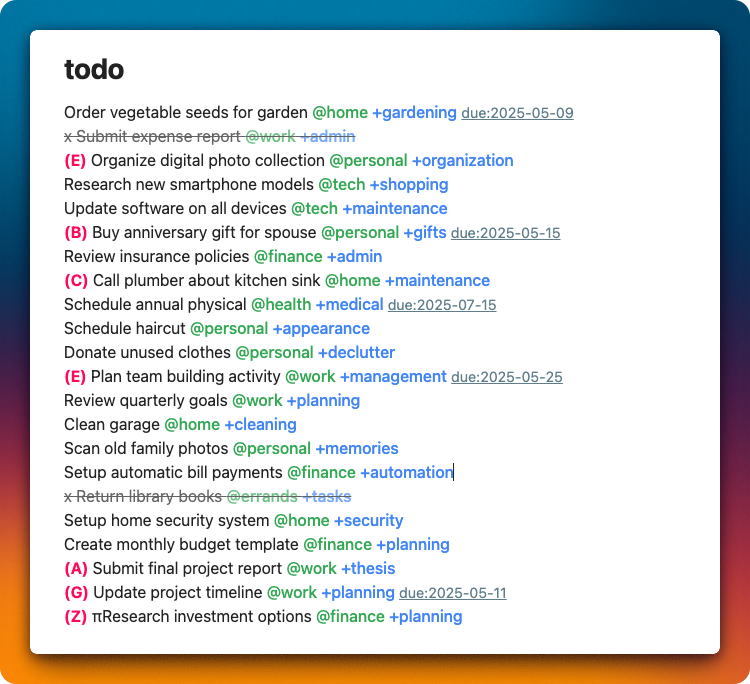
Features
-
Syntax Highlighting: Automatically highlights elements within todo.txt files
- Strikethrough for completed tasks (lines beginning with
x) - Highlighting for project tags (
+project) - Highlighting for context tags (
@context) - Highlighting for priority markers (
(A),(B),(123)) - Highlighting for due dates (
due:yyyy-mm-dd) - Color Customization: Customize colors with the Style Settings Plugin
- Strikethrough for completed tasks (lines beginning with
-
Task Management:
- Command to move completed tasks to a dedicated file
- Extracts completed tasks (lines beginning with
x) - Removes them from the original file
- Adds them to the top of the specified done file (newest tasks at the top)
-
Task Sorting:
- Sort by priority
- Sort by project
- Sort by context
- Sort by due date
- Support for boundary marker (lines below the marker won't be sorted)
-
Editor Monitoring and Syntax Highlighting Mechanism:
- User Open and edits a todo.txt file
- Changes are detected via Obsidian's
workspace.on('editor-change')event - Checks if the modified file is in todo.txt format
- Examines file content for special characters:
- "x " (completed task indicator)
- "@" (context tag prefix)
- "+" (project tag prefix)
- "(A)" (priority indicator)
- "due:" (due date indicator)
- Applies decorations
Installation
Manual Installation
- Download the zip file from the latest release
- Extract the zip and copy the folder to
.obsidian/plugins/ - Restart Obsidian and enable the plugin in settings
Community Plugin Installation
- Open Obsidian settings
- Go to "Third-party plugins" → "Community plugins" → "Browse"
- Search for "Todo.txt Mode" and install
Usage
Settings
- Open Obsidian settings
- Select "Third-party plugins" → "Todo.txt Mode"
- Configure:
- Todo.txt File Patterns: Paths to your todo files (relative to vault root)
- Done File Path: File path where completed tasks will be moved
- Boundary Marker: Line marker indicating where sorting should stop
- Highlight Settings: Enable/disable options for highlighting
- Color Customization: Install the Style Settings Plugin to customize colors
Commands
- Todo.txt: Move completed tasks to done file:
- Available from the command palette
- Moves all completed tasks at once
- Todo.txt: Sort by priority:
- Sorts tasks by priority
- Todo.txt: Sort by project:
- Sorts tasks by project tag
- Todo.txt: Sort by context:
- Sorts tasks by context tag
- Todo.txt: Sort by due date:
- Sorts tasks by due date
About todo.txt format
Basic todo.txt format:
x 2023-05-08 Completed task +project @context
Today's task +work @office
(A) High priority task +project
A task with due:2023-05-15 date
Visit the official website for more details.
For Developers
Release Process
# Update version number
npm run version

# Create and push tag
git tag -a 1.0.0 -m "1.0.0" && git push origin 1.0.0
Pushing a tag will automatically create a GitHub release.
Todo.txt Mode for Obsidian [JA]
Todo.txt Mode は Obsidian で todo.txt ファイル形式をサポートするためのプラグインです。
特徴
-
シンタックスハイライト: todo.txtファイル内の要素を自動的に強調表示
- 完了タスク(
xで始まる行)に取り消し線表示 - プロジェクトタグ(
+project)をハイライト - コンテキストタグ(
@context)をハイライト - 優先度(
(A)、(B)、(123))をハイライト - 期日(
due:yyyy-mm-dd)をハイライト - 色のカスタマイズ: Style Settings Pluginで色をカスタマイズ可能
- 完了タスク(
-
タスク管理:
- 完了タスクを専用ファイルに移動するコマンド
- 完了タスク(
xで始まる行)を抽出 - 元のファイルから削除
- 指定したdoneファイルの先頭に追加(新しいタスクが上)
-
タスクのソート:
- 優先度でソート
- プロジェクトでソート
- コンテキストでソート
- 期日でソート
- 境界線マーカーのサポート(この線以下の行はソートされません)
-
エディタ監視とシンタックスハイライトの仕組み:
- ユーザーがtodo.txt関連ファイルを開き、編集したとき
- Obsidianの
workspace.on('editor-change')イベントで変更を検知 - 変更されたファイルがtodo.txt形式であるか確認
- ファイル内容を各チェックし、特殊文字の存在を確認
- 「x 」(完了タスクの標識)
- 「@」(コンテキストタグの先頭)
- 「+」(プロジェクトタグの先頭)
- 「(A)」(優先度の標識)
- 「due:」(期日の標識)
- 装飾を適用
インストール
手動インストール
- 最新のリリースからzipファイルをダウンロード
- zipを解凍し、フォルダを
.obsidian/plugins/にコピー - Obsidianを再起動し、設定からプラグインを有効化
Communityプラグインからのインストール
- Obsidianの設定を開く
- 「サードパーティプラグイン」→「コミュニティプラグイン」→「閲覧」
- "Todo.txt Mode" を検索してインストール
使い方
設定
- Obsidianの設定を開く
- 「サードパーティプラグイン」→「Todo.txt Mode」を選択
- 以下の設定を行う:
- Todo.txt File Patterns: todo.txtファイルとして認識するパス(Vaultのルートからの相対パス)
- Done File Path: 完了タスクを移動する先のファイルパス
- Boundary Marker: ソートの境界線を示すマーカー(この行以下はソートされません)
- Highlight Settings: ハイライト表示の有効/無効設定
- 色のカスタマイズ: Style Settings Pluginをインストールすると色をカスタマイズできます
コマンド
- Todo.txt: Move completed tasks to done file:
- コマンドパレットから利用可能
- 完了したタスクを一括で移動
- Todo.txt: Sort by priority:
- タスクを優先度でソート(Aが最高)
- Todo.txt: Sort by project:
- タスクをプロジェクトタグでソート
- Todo.txt: Sort by context:
- タスクをコンテキストタグでソート
- Todo.txt: Sort by due date:
- タスクを期日でソート
todo.txt形式について
todo.txt形式の基本:
x 2023-05-08 完了したタスク +プロジェクト @コンテキスト
今日のタスク +仕事 @オフィス
(A) 優先度の高いタスク +プロジェクト
期日 due:2023-05-15 のあるタスク
詳細は公式サイトをご覧ください。