 0331491297
fix(plugin): guard shadow bootstrap against self-install when Connect is clicked inside the shadow window (1.1.7-beta.0) |
||
|---|---|---|
| .github | ||
| deploy | ||
| docker | ||
| docs | ||
| mobile | ||
| next | ||
| plugin | ||
| proto | ||
| server | ||
| .gitattributes | ||
| .gitignore | ||
| .node-version | ||
| .npmrc | ||
| .nvmrc | ||
| .prettierignore | ||
| .prettierrc | ||
| cliff.toml | ||
| commitlint.config.mjs | ||
| CONTRIBUTING.md | ||
| docker-compose.yml | ||
| LICENSE | ||
| LICENSE.txt | ||
| manifest-beta.json | ||
| manifest.json | ||
| package-lock.json | ||
| package.json | ||
| README.md | ||
| SECURITY.md | ||
| tsconfig.json | ||
| versions.json | ||
Remote SSH for Obsidian
Edit an Obsidian vault that lives on a remote server — over plain SSH. Think of VS Code's Remote-SSH, but for Obsidian: open a vault that sits on your home server, VPS, work box, or cluster, and edit it from a real Obsidian window. Files, attachments, search, and live updates — all served straight from the remote, over your own SSH connection.
No cloud. No sync service. No full copy left on your laptop. Your notes stay on the machine you control; this one only ever holds what you're actively looking at.
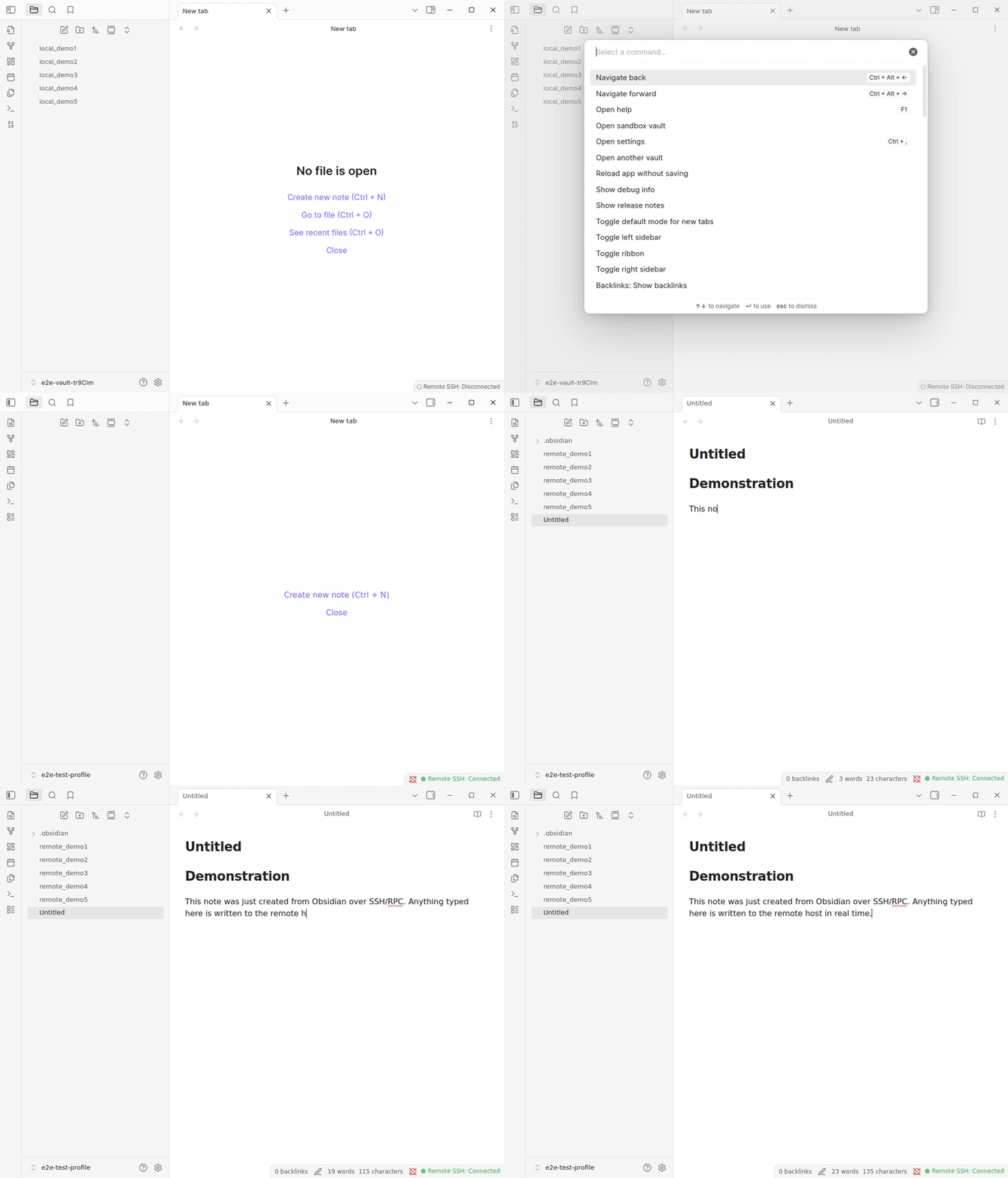
End-to-end demo, recorded in CI by demo-capture.yml — connect to a remote host and edit its vault from a normal Obsidian window.
Install
Obsidian → Settings → Community plugins → Browse → search "Remote SSH" → Install → Enable.
That's the whole install. The first time you connect with the (recommended) RPC transport, the plugin fetches the matching helper daemon from its signed GitHub release — with a one-time confirmation, verified by sha256 — and uploads it to your host for you. Prefer no remote-side binary? Stay on the SFTP transport and skip the daemon entirely.
Other install methods (BRAT for pre-release builds · manual)
BRAT (early/beta builds)
BRAT auto-installs and auto-updates pre-release builds straight from this repo:
- Install Obsidian42 - BRAT from Community plugins → Browse.
- BRAT settings → Add Beta plugin → paste
sotashimozono/obsidian-remote-ssh→ leave version blank. - Toggle Remote SSH on under Community plugins.
Manual
Download main.js, manifest.json, and styles.css from the
Releases page,
drop them into <your-vault>/.obsidian/plugins/remote-ssh/, and enable the
plugin. (The daemon still auto-downloads on first RPC connect; for an
air-gapped remote, grab the matching obsidian-remote-server-<os>-<arch>
binary from the same release and place it in …/remote-ssh/server-bin/.)
Why you'd want this
You already keep your notes — or your code, or your research — on a machine that isn't this one. A home server. A cloud VPS. The lab cluster. You SSH in all the time. You'd love to use Obsidian on those files without copying the whole vault down to every laptop and phone, and without handing it to a sync provider.
That's the entire point of this plugin:
- 🔑 Plain SSH, your keys, your config. Password, private key, SSH agent,
or a
ProxyJumpbastion — all read from the same~/.ssh/configyour terminal already uses. No account to create, no third-party server to trust. - ☁️ No cloud middleman. Files move directly between this machine and your host over the encrypted SSH tunnel. Nobody else ever holds your notes — and there's no telemetry or analytics; nothing leaves your machine except to the host you typed into a profile.
- 💻 No full local replica. Sync tools mirror your entire vault onto every device. This doesn't: the vault stays on the server, and your laptop only fetches the files you actually open (cached locally while you work, not a synced second copy of everything).
- 🧩 It's still Obsidian. The remote vault opens in a normal Obsidian window — real File Explorer, search, command palette, and most of the plugins you already use (Dataview, Templater, Excalidraw, Tasks, …).
What you can do with it
- Edit a remote vault as if it were local. SSH into your server; the vault
stays there, you get the full Obsidian editing experience here. No manual
rsync, no Dropbox dance. - Keep huge vaults where they belong. A 50k-file research vault or a media-heavy attachment vault doesn't need to land on every device — only the files you open are fetched.
- Let the server stay the source of truth. Cron jobs, scripts, an LLM
pipeline, or your own
gitcan keep operating on the canonical files; you're editing the same files, not a copy that races those writers. - Work from several machines. Live updates push between connected clients
via
fs.watch; if two saves collide, a 3-way merge UI (ancestor / mine / theirs) opens instead of silently clobbering. - Survive flaky networks. Disconnects spool your writes to an offline queue and drain them on reconnect; the status bar shows the pending count.
- Use a remote-side terminal. An integrated terminal pane runs on the remote, right next to the notes it's about.
Good fits
- A homelab / VPS where your notes already live, and you want them to stay there.
- A research / work cluster (e.g. an HPC login node) holding data and notes you SSH into anyway.
- Vaults that are too large or too private to replicate everywhere or to hand to a managed sync service — for legal, privacy, or compliance reasons.
Quickstart
About 3 minutes if you already have an SSH host.
- Add a profile. Settings → Remote SSH → + Add. Enter host, port,
username, auth method (
privateKey/password/agent), transport (RPCrecommended), and the remote vault path (relative paths resolve under$HOME—notes/main→~/notes/main). - Click Connect on the profile row, or run Remote SSH: Connect to remote vault from the command palette.
- A new Obsidian window opens — your "shadow vault". Same UI you know, but every file in it lives on the remote. Start editing.
To leave: close the shadow window, or run Remote SSH: Disconnect inside it. Your original window is never touched.
First time connecting a brand-new profile? Obsidian only learns about the new vault at startup, so the very first connect may need one restart of Obsidian before the window appears — then reconnect. It's a one-time step per profile; every later connect opens immediately.
Features
| Feature | Notes |
|---|---|
| 🪟 Opens in its own Obsidian window | The window you started from is untouched; the remote vault is a first-class window with its own File Explorer, search, and command palette. |
| ⚡ Sub-second cold-open, even for 10k-file vaults | A single fs.walk RPC fetches the whole tree in one round-trip (per-folder fs.list fallback for SFTP). |
| 🖼️ Image / PDF / video rendering | A local-only HTTP bridge (random localhost port + bearer token) streams binary content to the Obsidian webview; images go through a fs.thumbnail cache (RPC transport). |
| 🔁 Live multi-client sync | fs.watch notifies every connected client when another writer changes a file; explorer + open editors update within ~1 s. |
| 🪢 3-way conflict resolution | If the remote file moved under your edit, a merge modal opens with ancestor / mine / theirs panes (plain text; binaries fall back to a 2-choice modal). |
| 📥 Offline write queue | Writes during a disconnect spool to a local queue and drain automatically on reconnect; the status bar shows the pending count. |
| 🩹 Automatic reconnect with backoff | SSH drops trigger a retry loop (default 5, exponential backoff to 30 s); reads come from cache during retries, writes spool to the queue. |
🔌 Jump host / ProxyJump |
Multi-hop SSH through bastions, from the same ~/.ssh/config your terminal uses. |
| 🔐 Signed daemon binaries | Every release daemon is Sigstore-cosign-signed; the plugin also runs a sha256 round-trip check on every deploy and refuses a mismatch. |
How it compares (the short version)
Most "edit my vault from anywhere" options copy the vault around —
Obsidian Sync (managed, encrypted, on Obsidian's servers), file-sync tools
(Syncthing / Dropbox / iCloud), or obsidian-git (a git repo you pull/push).
Each is great when replicating the vault is what you actually want.
This plugin is for the opposite case: the vault should live only on a remote host you control, with no second copy and no third party — and you want to edit it in place. If that's your situation, this is the niche it's built for; if not, one of the above is simpler.
Full breakdown (when to pick which): docs → comparison.
What stays on your computer
By design, the canonical vault never leaves your SSH host. On the local side:
| Capability | Why it's needed | Scope |
|---|---|---|
| Network | The SSH/SFTP connection | Only the host / port / optional jump host in your profile |
| Filesystem (outside the vault) | Read your SSH key + ~/.ssh/config to authenticate; cache the daemon binary |
~/.ssh/* and the plugin's own server-bin/ cache only |
| System identity | Sensible defaults for the client id + remote username | os.hostname() / os.userInfo().username (both overridable); SSH_AUTH_SOCK etc. to find your agent/config |
| Process execution | Start the daemon on the remote over SSH | Remote host only — no local shell execution |
| Clipboard (write) | The "Copy diagnostics" button | Only on explicit click; the clipboard is never read |
No telemetry, no analytics. Locally you keep only a working cache of the files you've opened — never a full replica of the vault.
Security
Daemon binaries are signed with Sigstore cosign
(keyless OIDC); verify any release binary yourself with the one-line
cosign verify-blob in SECURITY.md.
On every deploy the plugin re-checks the uploaded binary by sha256 and refuses
to start a mismatch.
To report a vulnerability, use a private GitHub Security Advisory — policy in SECURITY.md. Please don't open a public issue for security bugs.
Plugin compatibility
The shadow vault patches app.vault.adapter, so plugins that go through
Obsidian's vault API work transparently — Dataview, Templater, Daily Notes,
Tasks, Calendar, Excalidraw (RPC transport), and most others. Plugins that
bypass the adapter (importing Node fs directly, e.g. Omnisearch's
indexer) see an empty local directory instead of your remote vault.
Full matrix: docs → plugin compatibility.
Troubleshooting
The console log is the first thing to check (JSONL, one event per line):
~/.obsidian-remote/vaults/<profile-id>/.obsidian/plugins/remote-ssh/console.log
jq 'select(.level == "error")' console.log    # just the errors
tail -20 console.log | jq -c '{ts, level, msg}'
A few common ones:
- No new window opens after connecting a new profile — Obsidian only registers new vaults at startup. Fully quit and reopen Obsidian, then Connect again (one-time per profile; tracked in #411).
- Shadow window opens but File Explorer is empty — the auto-connect failed. Check the shadow window's console log and run Remote SSH: Reconnect from the command palette.
- Images / PDFs don't render — those need the
RPCtransport; check the profile's transport setting. - Connect succeeds but the daemon won't come up — the session falls back
to SFTP (vault read/write still work; daemon-only features are off). See the
daemon log:
ssh <host> 'cat ~/.obsidian-remote/server.log'.
More: docs → troubleshooting.
How it works (technical)
Obsidian doesn't expose a public way to rebuild the vault model from a different storage adapter mid-session, so the plugin opens a separate shadow window whose vault is constructed from the remote tree at startup — every plugin in that window sees a normal-looking vault from frame zero.
flowchart LR
subgraph Original["Original window"]
U[Click Connect on profile P] --> M[ShadowVaultManager]
end
M --> B["ShadowVaultBootstrap<br/>materialise ~/.obsidian-remote/vaults/<P>/<br/>install plugin · seed autoConnectProfileId=P"]
B --> R["ObsidianRegistry<br/>register vault in obsidian.json"]
R --> W["WindowSpawner<br/>obsidian://open?path=…"]
W -.spawn.-> L
subgraph Shadow["Shadow window"]
L[onLayoutReady → connect to P] --> P[Patch app.vault.adapter → remote FS client]
P --> WK[fs.walk RPC / fs.list fallback]
WK --> V[VaultModelBuilder → File Explorer]
end
subgraph Transport["SSH transport"]
P -. fs ops .-> RPC[RpcRemoteFsClient]
P -. or .-> SFTP[SftpRemoteFsClient]
RPC --> D[(Go daemon · framed JSON-RPC over a unix-socket stream)]
SFTP --> SSH[(ssh2 SFTP)]
D --> FS[(Remote vault files)]
SSH --> FS
end
Two transports per profile:
RPC(recommended). A small Go daemon (obsidian-remote-server) runs on the remote; the plugin auto-fetches the signed binary, uploads it, and starts it. Vault FS ops flow as length-framed JSON-RPC over a forwarded unix socket. Required for image/PDF/video rendering, sub-second cold-open, thumbnails, and livefs.watchupdates.SFTP. Direct SFTP overssh2, no remote-side install — loses the daemon-only features above.
Design deep-dives: shadow-vault architecture · performance · conflicts & offline queue.
Contributing
Contributions welcome — dev setup, branch + commit conventions, and how to run the test suite are in CONTRIBUTING.md. Bugs and feature requests: Issues.
Inspired by VS Code's Remote-SSH; the wire format is LSP-style framed JSON-RPC over a unix-socket-forwarded stream — the same shape language servers use, just for filesystem ops.
Support
Remote SSH is, for now, maintained by a single individual. Sponsoring it helps sustain the continued maintenance and ongoing issue responses over time, which genuinely matters for a one-person project. Hugely appreciated 🙏
(A donate link also lives right in the plugin's settings page.)
Project status
Released and available in the Obsidian Community Plugins store. Daemon binaries are cosign-signed and end-to-end tested against Linux + macOS remotes.




Build · coverage · platform badges (for contributors)






