| .github | ||
| docs | ||
| src | ||
| .editorconfig | ||
| .eslintignore | ||
| .eslintrc | ||
| .eslintrc.json | ||
| .gitignore | ||
| .npmrc | ||
| CHANGELOG.md | ||
| esbuild.config.mjs | ||
| jest.config.js | ||
| LICENSE | ||
| manifest.json | ||
| package-lock.json | ||
| package.json | ||
| README.md | ||
| styles.css | ||
| tsconfig.json | ||
| version-bump.mjs | ||
| version-changelog.mjs | ||
| versions.json | ||

Tag Index


An Obsidian plugin that creates a curated list of important tags to serve as meaningful entry points to your knowledge base.

Features
Tag Index solves the problem of tag overload by giving you a dedicated space for your most important tags:
Core Features
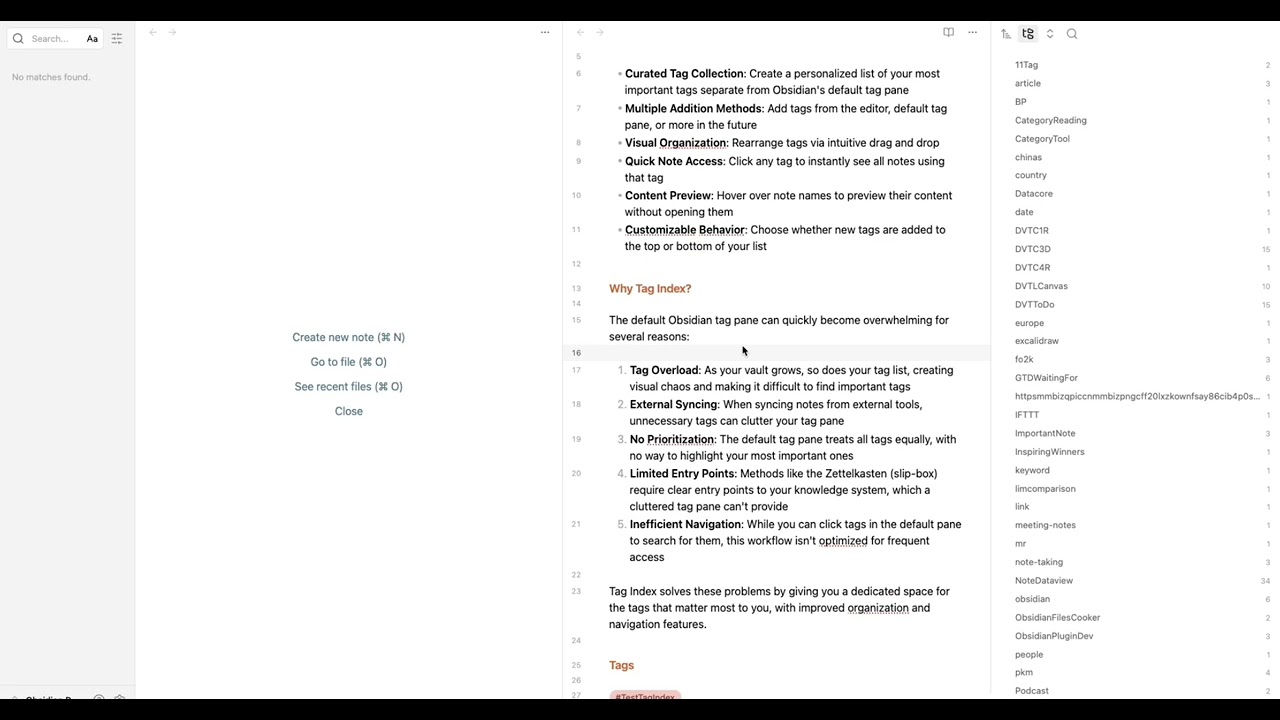
- Curated Tag Collection: Create a personalized list of your most important tags separate from Obsidian's default tag pane
- Hierarchical Tag Support: Full support for nested tags with automatic tree structure (e.g.,
#project/dev/feature) - Multiple Addition Methods: Add tags from the editor context menu, default tag pane, or command palette
- Visual Organization: Rearrange tags via intuitive drag and drop
- Quick Note Access: Click any tag to instantly see all notes using that tag
- Flexible Note Sorting: Sort notes under each tag by file name, modified time, or created time with one click
Line Content Display
- See Where Tags Appear: View the actual line content where each tag exists in your notes
- Clickable Navigation: Click any line content to jump directly to that location in your note
Interactive Navigation
- Jump to Line: Click line content to open the file at the exact line
- Jump and Search: Optionally open the search pane to see all tag occurrences across your vault
- Configurable Cursor: Choose whether the cursor lands at the start or end of the line
- Hover Preview: Hover over note names to preview their content without opening them
Performance & Customization
- Configurable Refresh Delay: Set refresh delays from instant to 60 minutes based on vault size
- Customizable Behavior: Choose whether new tags are added to the top or bottom of your list
Videos and Articles
Videos
Articles
Why Tag Index?
The default Obsidian tag pane can quickly become overwhelming for several reasons:
- Tag Overload: As your vault grows, so does your tag list, creating visual chaos and making it difficult to find important tags
- External Syncing: When syncing notes from external tools, unnecessary tags can clutter your tag pane
- No Prioritization: The default tag pane treats all tags equally, with no way to highlight your most important ones
- Limited Entry Points: Methods like the Zettelkasten (slip-box) require clear entry points to your knowledge system, which a cluttered tag pane can't provide
- Inefficient Navigation: While you can click tags in the default pane to search for them, this workflow isn't optimized for frequent access
Tag Index solves these problems by giving you a dedicated space for the tags that matter most to you, with improved organization and navigation features.
Getting Started
Adding Tags
You can add tags to your index in multiple ways:
- From the Editor: Right-click on any tag in your notes → "Add to tag index"
- From Tag Pane: Right-click on any tag in Obsidian's default tag pane → "Add to tag index"
- Via Command: Use the command palette (Ctrl/Cmd+P) → "Tag Index: Add to tag index"
Sorting Notes
Change how notes are sorted under each tag:
- Quick sort: Click the sort button (arrow icon) at the top of the tag panel
- Choose from 6 sorting options:
- File name (A to Z / Z to A)
- Modified time (new to old / old to new)
- Created time (new to old / old to new)
- Set default: Configure your preferred default in Settings → Tag Index
Using Line Content Display
The plugin can show you exactly where tags appear in your files:
- Enable "Show line content" in settings
- Click on any tag to expand it
- See all files containing that tag
- View the actual lines where the tag appears
- Click any line to jump directly to that location
Configuring Behavior
Access settings via Settings → Tag Index:
- Add new tags to top: Control where new tags appear in your list
- Auto-open tag index panel: Automatically open the panel when Obsidian starts
- Show line content: Toggle the line content display feature
- Line content click behavior: Choose between "Jump to line" or "Jump to line and search"
- Cursor position: Set cursor position when jumping (start or end of line)
- Refresh delay: Configure auto-refresh timing (0-60 minutes) based on your vault size
- Default note sort method: Set your preferred sorting method for notes under tags
Documentation
Visit the documentation site to learn how to make the most of Tag Index in your Obsidian workflow.
Support & Community
This plugin is developed and maintained during my free time. A lot of thought, energy, and care goes into making it reliable and user-friendly.
If you find Tag Index valuable in your daily workflow:
- If it helps you organize your tags more effectively
- If it saves you time and mental energy navigating your knowledge base
- If it provides a better entry point to your notes
Please consider supporting my work. Your support would help me dedicate more time and energy to:
- Developing new features
- Maintaining code quality
- Providing support and documentation
- Making the plugin even better for everyone
Ways to Support
You can support this project in several ways:
- ⭐ Star the project on GitHub
- 💝

- 💌 Share your success stories and feedback
- 📢 Spread the word about the plugin
- 🐛 Report issues to help improve the plugin
Thank you for being part of this journey! 🙏