| .github/workflows | ||
| assets | ||
| .editorconfig | ||
| .eslintignore | ||
| .eslintrc | ||
| .gitignore | ||
| .npmrc | ||
| esbuild.config.mjs | ||
| extract_katexcss.py | ||
| katex.min.css | ||
| LICENSE | ||
| main.ts | ||
| manifest.json | ||
| package-lock.json | ||
| package.json | ||
| pseudocode.d.ts | ||
| README.md | ||
| styles.css | ||
| tsconfig.json | ||
| version-bump.mjs | ||
| versions.json | ||

Obsidian-Pseudocode
This is a plugin for Obsidian that allows you to render LaTeX-style pseudocode inside a code block. The plugin is based on pseudocode.js, a JavaScript library that typesets pseudocode beautifully to HTML.
Features
- Intuitive grammar: The plugin takes a LaTeX-style input that supports the algorithmic constructs from LaTeX's algorithm packages. With or without LaTeX experience, a user should find the grammar fairly intuitive.
- Print quality: The HTML output produced by the plugin is (almost) identical with the pretty algorithms printed on publications that are typeset by LaTeX.
- Math formula support: Inserting math formulas in the pseudocode is as easy as LaTeX. Just enclose math expression in
$...$or\(...\).
Future Features
- Generate a LaTeX file that can be compiled, including any required additional macros.
- Syntax highlighting.
- Auto-completion inside
pseudocode block. (Release 1.1.0)
Usage
To use the plugin, simply create a code block in your Obsidian note and add your pseudocode inside it. Then, add the language specifier pseudo (short for "pseudocode") to the code block. The plugin will automatically render the pseudocode as LaTeX.
Rocommend: use the command Pseudocode: Insert a new pseudocode block to start.
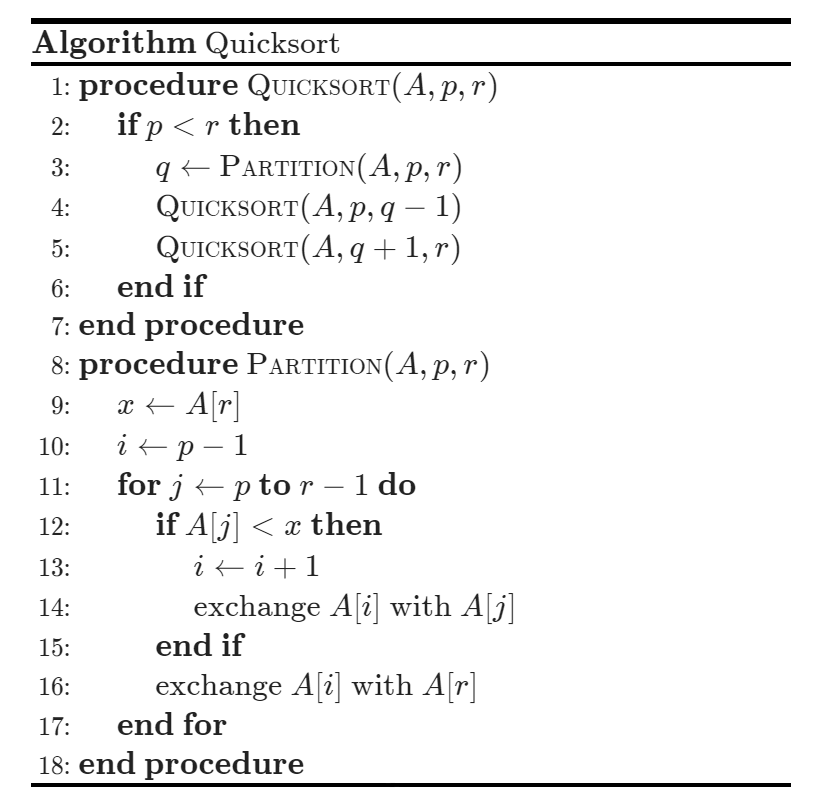
Here is an example:
    ```pseudo
    \begin{algorithm}
    \caption{Quicksort}
    \begin{algorithmic}
      \Procedure{Quicksort}{$A, p, r$}
        \If{$p < r$}
          \State $q \gets $ \Call{Partition}{$A, p, r$}
          \State \Call{Quicksort}{$A, p, q - 1$}
          \State \Call{Quicksort}{$A, q + 1, r$}
        \EndIf
      \EndProcedure
      \Procedure{Partition}{$A, p, r$}
        \State $x \gets A[r]$
        \State $i \gets p - 1$
        \For{$j \gets p$ \To $r - 1$}
          \If{$A[j] < x$}
            \State $i \gets i + 1$
            \State exchange
            $A[i]$ with $A[j]$
          \EndIf
        \State exchange $A[i]$ with $A[r]$
        \EndFor
      \EndProcedure
      \end{algorithmic}
    \end{algorithm}
    ```
This will be rendered as:
Installation
Install from the Community Plugins in Obsidian.
🎉 The Pseudocode plugin is now available in the Community Plugins section of Obsidian. To install it, simply search for Pseudocode and click on the installation button.
Use BRAT
- Install Obsidian-42 BRAT from the Community Plugins in Obsidian.
- Open the command palette and run the command
BRAT: Add a beta plugin for testing. Input this repo's URLhttps://github.com/Yaotian-Liu/obsidian-pseudocode. - Click on Add Plugin -- wait a few seconds and BRAT will tell you what is going on.
- After BRAT confirms the installation, in Settings go to the Community plugins tab.
- Refresh the list, find
Pseudocodeand enable it.
Manual install
- Create a folder named
pseudocode-in-obsin your Obsidian vault plugin folder (which is {Your Vault}/.obsidian/plugins). - Download
main.js,manifest.jsonandstyles.cssfrom the releases page, to the folder you just created in step 1. - Open your Obsidian, and enable the plugin in "Community Plugins" setting page.
- Enjoy.
Credits
This plugin is based on pseudocode.js, a JavaScript library that typesets pseudocode beautifully to HTML. Many thanks to the pseudocode.js team for their great work!