mirror of
https://github.com/akaalias/extract-highlights-plugin.git
synced 2026-07-22 05:10:29 +00:00

119 lines
5 KiB
Markdown
119 lines
5 KiB
Markdown
## Extract Highlights Plugin
|
||

|
||
|
||
Create and extract highlights from a current markdown note in Obsidian into your clipboard. Based on [icebear's plugin request](https://forum.obsidian.md/t/extract-highlights-from-note/7867).
|
||
|
||
## Training Videos
|
||
|
||
### Watch: The Quick-Start Tutorial!
|
||
|
||
[](https://youtu.be/KWdEatdD2bo)
|
||
|
||
### Watch: A SECRET NEW highlight mode
|
||
|
||
[](https://youtu.be/5kkcqAn6joU)
|
||
|
||
### Watch: Tips and Tricks for the SECRET mode
|
||
|
||
[](https://youtu.be/n3YW5bmnETg)
|
||
|
||
### How it works
|
||
This plugin will copy the highlights delimited by `==`, `**` and `<mark></mark>` into your clipboard as a bullet-list.
|
||
|
||
Optionally you can customize...
|
||
|
||
* **The heading text of the list**, include the note-title or hide it all-together
|
||
* **Adding a footnote** to each that link back to the source-file
|
||
* **Creating an ad-hoc map-of-content (MOC)** by turning each highlight into an `[[` Obsidian link `]]`
|
||
* **Auto-capitalize** the first letter in each highlight for consistency
|
||
|
||
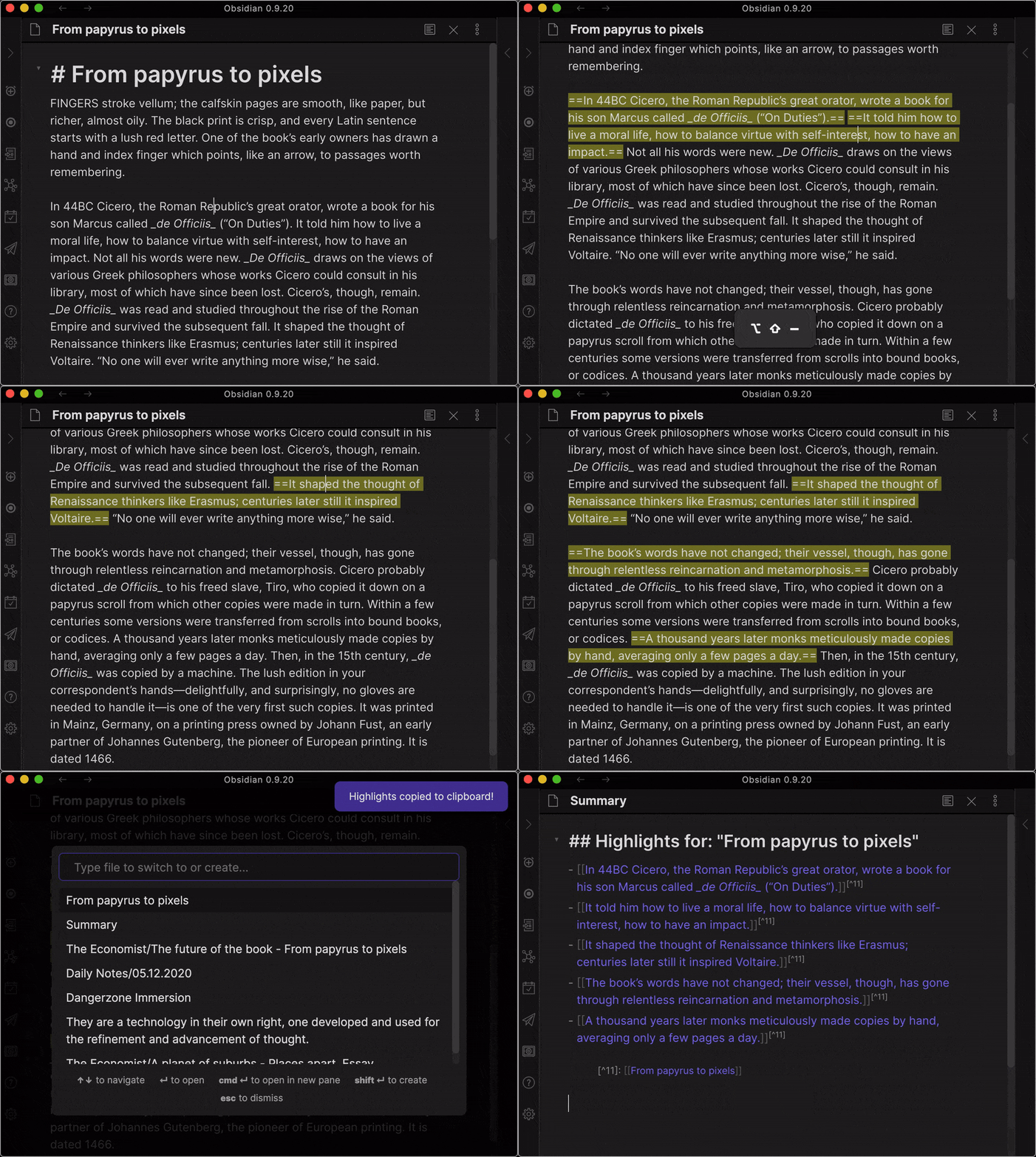
### Demo Creating and Extracting Highlights
|
||
|
||
1. First you see how I use the CREATE highlights hot-key to highlight sentences
|
||
2. Then you see how I use the EXTRACT highlights hot-key to create a new file with the highlights
|
||
|
||
|
||
|
||
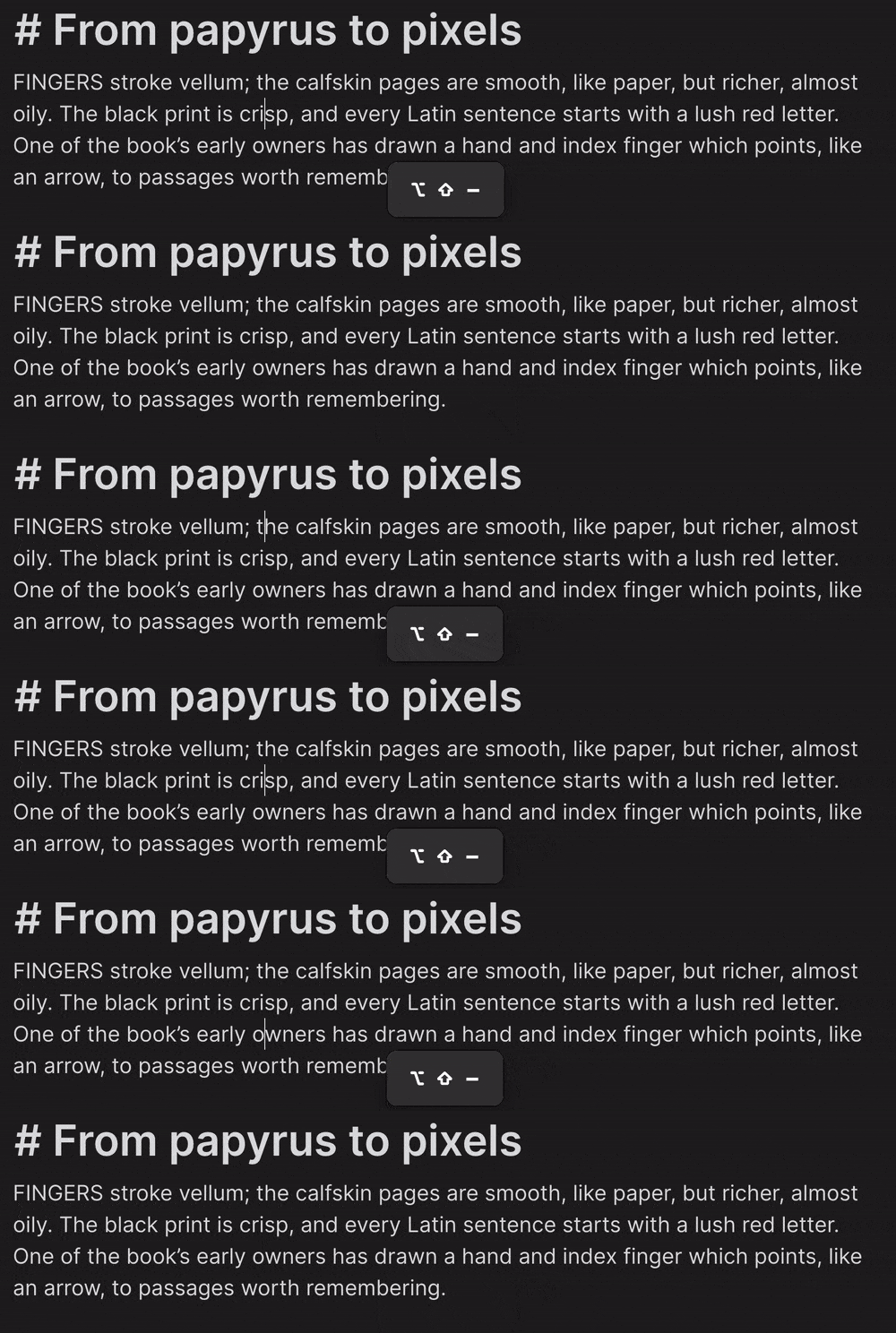
#### Using the Hotkey to HIGHLIGHT (and UN-HIGHLIGHT) the sentence under cursor
|
||
|
||
The default hotkey for this is:
|
||
|
||
<kbd>SHIFT</kbd> + <kbd>ALT</kbd> + <kbd>_</kbd>
|
||
|
||
Super useful for when you're reading and just don't want to switch to your mouse for selecting the sentence.
|
||
|
||
|
||
|
||
Will remove highlighting if the sentence under your cursor is currently delimited by "==".
|
||
|
||
#### Using the Hotkey to EXTRACT highlights
|
||
|
||
The default hotkey is:
|
||
|
||
<kbd>SHIFT</kbd> + <kbd>ALT</kbd> + <kbd>=</kbd>
|
||
|
||
#### Using the Ribbon Button
|
||
There is also a button (a circle-shape) that's added to your left-side ribbon.
|
||
|
||
Clicking on it will also extract all highlighted parts in your current note and place it in your clipboard.
|
||
|
||
#### Using the Command Palette
|
||
I looked into it and there’s a bug the way clipboard works with the Command Palette. Basically everything but the “Paste” works.
|
||
|
||
But I’ve found a temporary work-around. It’s weird but it works.
|
||
|
||
1. Trigger Command Palette (Command-P)
|
||
2. Find “Extract Highlights”
|
||
3. Hit Enter (You should see a notification (“Highlights copied to clipboard!”)
|
||
4. Workaround: At this point, briefly switch to a different note and back (This materialises the clipboard data for pasting)
|
||
5. Paste works now the same as with the Hotkey and Button-press
|
||
|
||
#### Pasting highlights from your clipboard
|
||
|
||
After using the hotkey, button or command palette, anywhere you want, just paste the clipboard!
|
||
|
||
<kbd>Command</kbd> + <kbd>v</kbd> (MacOS) or the equivalent on Windows/Linux
|
||
|
||
The output is a markdown-block titled "Highlights" with a bullet-list of the highlights.
|
||
|
||
### Feedback
|
||
Are you using Extract Highlights? I'd love to hear from you!
|
||
|
||
[Share your questions and suggestions in the forum](https://forum.obsidian.md/t/extract-highlights-plugin/8763/12)
|
||
|
||
|
||
### Backlog
|
||
#### TODO
|
||
- Record video on using the "explosion mode" for research and creating atomic notes
|
||
- Pre-requisites
|
||
- Highlights Plugin
|
||
- Create links
|
||
- Create page
|
||
- Enable explode mode
|
||
- Open notes on creation
|
||
- Sliding Panes Plugin
|
||
- Start with a good article (Economist)
|
||
- Go through and highlight sentences
|
||
- Create MOC and explode into notes
|
||
- BOOOMMMMM!!!
|
||
- You've got an MOC
|
||
- You've got the core for single-idea, atomic notes
|
||
- You've got a backlink to the original file
|
||
|
||
#### DOING
|
||
...
|
||
|
||
#### DONE
|
||
- [x] "Explode" highlights into individual notes (assumes I'm creating the list of links as well)
|
||
- [x] command (<kbd>SHIFT</kbd> + <kbd>ALT</kbd> + <kbd>=</kbd>) which then copies all of the highlighted text either into:
|
||
- [x] click a button which then copies all of the highlighted text either into:
|
||
- [x] allow for `<mark></mark>` to be used as highlights
|
||
- [x] allow for standard bold (`**`) to be used as highlights
|
||
- [x] allow to optionally include or completely exclude `## Highlights` heading
|
||
- [x] allow to change text in heading `## My Custom Highlights`
|
||
- [x] allow to include note-name in heading such as `## From: $NOTE_TITLE`
|
||
- [x] allow to add footnotes for each highlight and include link to source-note
|
||
- [x] allow to optionally enable bold for highlights
|
||
- [x] allow for Command Palette to trigger copying (Works sort of, bug in Electron)
|
||
- [x] my clipboard
|
||
- [x] a new note
|