| .github/workflows | ||
| .vscode | ||
| images | ||
| obsidian_srcs | ||
| srcs | ||
| .editorconfig | ||
| .eslintignore | ||
| .eslintrc | ||
| .gitignore | ||
| .npmrc | ||
| esbuild.config.mjs | ||
| jest.config.js | ||
| LICENSE | ||
| manifest.json | ||
| package.json | ||
| README.md | ||
| sync_obsidian.mjs | ||
| TODO.md | ||
| tsconfig.jest.json | ||
| tsconfig.json | ||
| versions.json | ||

Redirection
Recommend various-complements-plugin ! I didn't notice that there is a leading plugin with exactly same purpose :). This plugin might not be updated further. If you enjoyed the feature of this plugin, visit Various Complements plugin!
Warning
!!!TESTING!!!
Becareful for unexpected loss of data
Demo
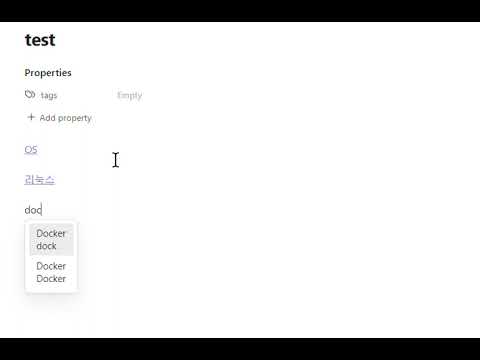
Keyword Suggest
This plugin aims to give users better experience in linking their notes while writing note. Obsidian requires to write [[ to connect note to note, which is quite time-consuming and distracting when writing.
This plugin allows users to define paths, and tags to be tracked so that users can get suggestions of tracked notes.

Traked Notes
For convinence and funtionality, this plugin tracks only user defined set of keywords. Keywords can be the name of note or aliases.
Priority
This plugin tracks user's selection of each note to suggest frequently connected notes on top.
Folder
Users can configure folders under which all files under are tracked.
Tags
Users can configure tags with which notes are tracked.
Bugs and Suggestions
For Suggestions and bug report, mail to khs1903b@gmail.com please.
Thanks for your use!
한국어 설명 (Korean Instruction for my friends!)
- 커뮤니티 플러그인 중 Suggest Notes를 활성화 해주세요!
- Suggest Notes를 활성화하면 기어 모양의 설정 아이콘이 보입니다. 클릭해주세요!
- 이런 설정창이 나오면 빠르게 연결할 노트의 경로나 tag를 설정해주시면 됩니다!
-
예를 들어 여러분이 Study 폴더의 Summary 폴더아래에 있는 모든 노트를 빠르게 연결하고 싶으시다면 Path of directories에 Study/Summary를 입력해주시면 됩니다. 여러 폴더를 설정하고 싶으시면
;로 구분하셔서 작성하시면 됩니다. -
혹은 노트의 tag로도 설정할 수 있습니다.

위 경로에 포함되지 않더라도 직접 정한 (여기서는 link-note) 테그를 노트에 추가하면 빠른 연결을 사용할 수 있습니다.