 47643cc91c
- manifest.json description now leads with the action ("Fuzzy-find a
  tag, then a note tagged with it") and mentions the Quick Switcher
  framing. Three natural occurrences of tag/tagged for marketplace
  search relevance vs. the previous single occurrence.
- README opener reframes the plugin against the existing tag-plugin
  neighborhood ("Built for navigation, not tag management") so users
  arriving from a "tag" search understand the differentiation vs.
  Tag Wrangler / Tag Tactician without trash-talking them.
- Removed the "pending review" status badge and callout (plugin is
  live at community.obsidian.md/plugins/tag-fuzzy-find) and reordered
  the install section so Community Plugins is the primary path and
  manual install is the fallback.

Co-Authored-By: Claude Opus 4.7 (1M context) <noreply@anthropic.com>
|
||
|---|---|---|
| .github/workflows | ||
| docs | ||
| scripts | ||
| src | ||
| tests | ||
| .gitignore | ||
| CHANGELOG.md | ||
| esbuild.config.mjs | ||
| eslint.config.mjs | ||
| LICENSE | ||
| manifest.json | ||
| package.json | ||
| README.md | ||
| tsconfig.json | ||
| versions.json | ||
| vitest.config.ts | ||
Tag Fuzzy Find



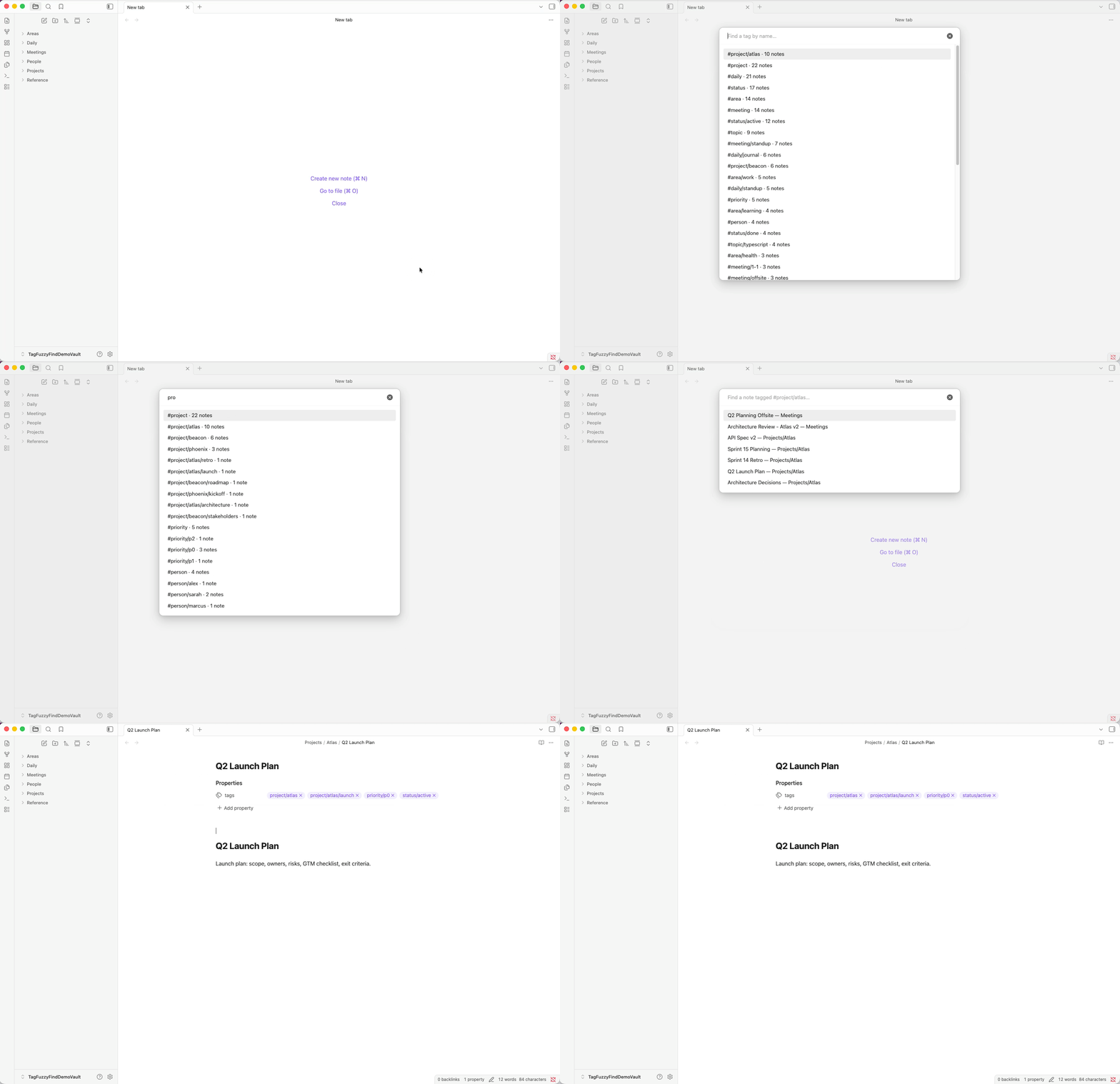
A keyboard-first Quick Switcher for tags. Fuzzy-find any tag in your vault, then jump straight to a note that uses it. Built for navigation, not tag management — if you've ever wished Cmd+O could search tags as well as files, this fills that gap.
What it does
Obsidian's built-in Quick Switcher finds files and headings, but there's no first-class way to find a tag. Tag Fuzzy Find fills that gap:
- Open the modal — fuzzy-search every tag in your vault, with usage counts.
- Pick one — drill straight into the notes that carry it.
- Pick a note — open it in the current pane, a new tab, or a split.
It honors Obsidian's nested-tag semantics: choosing #project surfaces notes tagged #project/work/urgent too.
Features
- Two-step flow. Tag picker → note picker.
Backspaceon an empty query takes you back to the tag picker, with your previous query preserved. - Quick Switcher hook. Typing a configurable prefix character (default
#) as the first character in the built-inCmd+Oswitcher reroutes you straight into Tag Fuzzy Find. Works with:,@,!,>,?if#collides with your file names. - Smart initial ordering. Default: recently-picked tags first, then the rest by usage. Switch to alphabetical or usage-only in settings.
- Nested tag inclusion.
#projectincludes#project/work,#project/work/urgent, etc. - Standard keyboard shortcuts.
Enteropens in current pane,Cmd/Ctrl+Enteropens in a new tab,Shift+Enteropens in a split,Esccloses. - Zero ceremony. No background indexing, no extra settings panes — runs entirely on Obsidian's existing metadata cache.
Installation
Via Community Plugins (recommended)
Settings → Community plugins → Browse → search Tag Fuzzy Find → Install → Enable.
Via BRAT
Add the repo URL etaiso/obsidian-tag-fuzzy-find in BRAT and it will install the latest release.
Manual
- Download
main.jsandmanifest.jsonfrom the latest release. - Create the folder
<your-vault>/.obsidian/plugins/obsidian-tag-fuzzy-find/. - Copy
main.jsandmanifest.jsoninto it. - In Obsidian: Settings → Community plugins → turn off Restricted Mode → enable Tag Fuzzy Find.
Usage
Open the plugin
Either way works:
- Run the command Tag Fuzzy Find: Open from the command palette (
Cmd/Ctrl+P). Bind a hotkey in Settings → Hotkeys for fastest access. - Press
Cmd/Ctrl+Oto open the built-in Quick Switcher, then type the configured trigger character (default#). The switcher reroutes to Tag Fuzzy Find with the remaining text pre-filled.
Navigate
| Key | Action |
|---|---|
Enter |
Open the highlighted note in the current pane |
Cmd/Ctrl+Enter |
Open in a new tab |
Shift+Enter |
Open in a split |
Backspace (when query is empty) |
Return to the tag picker |
Esc |
Close |
Settings
| Setting | What it does | Default |
|---|---|---|
| Initial sort | Order of tags before you type. Recent-then-usage / Most-used / Alphabetical / Empty until typing. | Recent-then-usage |
| Quick Switcher trigger | First character to type in the Quick Switcher to open Tag Fuzzy Find. | # |
| Integrate with Quick Switcher | Toggle the Cmd+O interop. |
On |
| Recent tags to remember | Size of the recent-tags list (0 disables it). | 10 |
| Clear recent tags | One-shot button to wipe the recent list. | — |
Development
Built with TypeScript + esbuild + vitest. No runtime dependencies beyond Obsidian itself.
Setup
git clone https://github.com/etaiso/obsidian-tag-fuzzy-find.git
cd obsidian-tag-fuzzy-find
npm install
npm run dev   # esbuild watch — rewrites main.js on save
Testing locally against a real vault
- Create a dedicated test vault in Obsidian (don't use your real one). Example:
~/Documents/TagFuzzyFindTestVault. - Symlink the project into the test vault's plugins directory:
mkdir -p ~/Documents/TagFuzzyFindTestVault/.obsidian/plugins ln -s "$(pwd)" ~/Documents/TagFuzzyFindTestVault/.obsidian/plugins/obsidian-tag-fuzzy-find - In Obsidian: Settings → Community plugins → turn off Restricted Mode → enable Tag Fuzzy Find.
- Recommended: install the Hot Reload plugin in the same vault — it auto-reloads Tag Fuzzy Find on every
main.jsrewrite. - Seed the vault with test data:
For richer, demo-friendly content (realistic note titles and tag hierarchies — useful when recording screenshots or a GIF), use the demo seed instead in a dedicated vault:npx tsx scripts/seed-vault.ts ~/Documents/TagFuzzyFindTestVaultnpx tsx scripts/seed-demo-vault.ts ~/Documents/TagFuzzyFindDemoVault
Tests
npm test           # vitest — pure-logic suites for settings, recent tags, tag index
npm run typecheck  # tsc --noEmit
Obsidian has no headless runtime, so modal behavior and the Quick Switcher hook are verified manually against the matrix in docs/test-plan.md.
Releasing
- Bump
versioninmanifest.jsonandpackage.json(keep them in sync). - Add an entry to
CHANGELOG.md. - Commit and push.
- Tag with the unprefixed semver version (e.g.
0.2.0, notv0.2.0) and push the tag — the GitHub Actions release workflow will produce a draft release withmain.jsandmanifest.jsonattached. - Review the draft release and publish it.
License
MIT © Etai Solomon