 32f8dc9f89
Der Kommentar nannte die zuständige Regel nicht. PROF-OBS-06 regelt diese Wahl bereits: Card-Optik der deklarativen API und einklappbare Sektionen schließen sich aus, weil SettingDefinitionGroup kein Collapse kennt (an obsidian.d.ts 1.13.1 verifiziert). Plugins mit bewussten Collapsibles dürfen die Regel abschalten — letterhead nutzt keine, der Override ist hier also nicht gedeckt und läuft nur bis zur Migration. Ergänzt außerdem den Hinweis, dass vault-crews/src/obsidian/settings.ts:82 dieselbe widerlegte Begründung trägt, und den Zeiger auf die vorhandene Referenzimplementierung in markdown-presentation/src/settings.ts:45 (+ :161 für den <1.13-Fallback) — die frühere Annahme "kein Nachbar-Plugin nutzt die API" war falsch. Co-Authored-By: Claude Opus 4.8 (1M context) <noreply@anthropic.com> |
||
|---|---|---|
| .github/workflows | ||
| docs | ||
| examples | ||
| presets | ||
| scripts | ||
| src | ||
| tests | ||
| tools | ||
| .editorconfig | ||
| .gitignore | ||
| AGENTS.md | ||
| CHANGELOG.md | ||
| CLA.md | ||
| CONTRIBUTING.md | ||
| esbuild.config.mjs | ||
| eslint.config.mjs | ||
| LICENSE | ||
| LICENSE-DOCS | ||
| LICENSING.md | ||
| manifest.json | ||
| package-lock.json | ||
| package.json | ||
| README.de.md | ||
| README.md | ||
| SECURITY.de.md | ||
| SECURITY.md | ||
| styles.css | ||
| tsconfig.json | ||
| versions.json | ||
| vitest.config.ts | ||
Letterhead – DIN 5008 & modern letters
🇬🇧 English · 🇩🇪 Deutsch
An Obsidian plugin that turns a note into a professionally formatted business letter — German DIN 5008 or a clean modern layout — and exports it to PDF: on desktop via the OS print dialog, on iPhone/iPad as a real, text-selectable PDF shared with one tap.


-lightgrey)
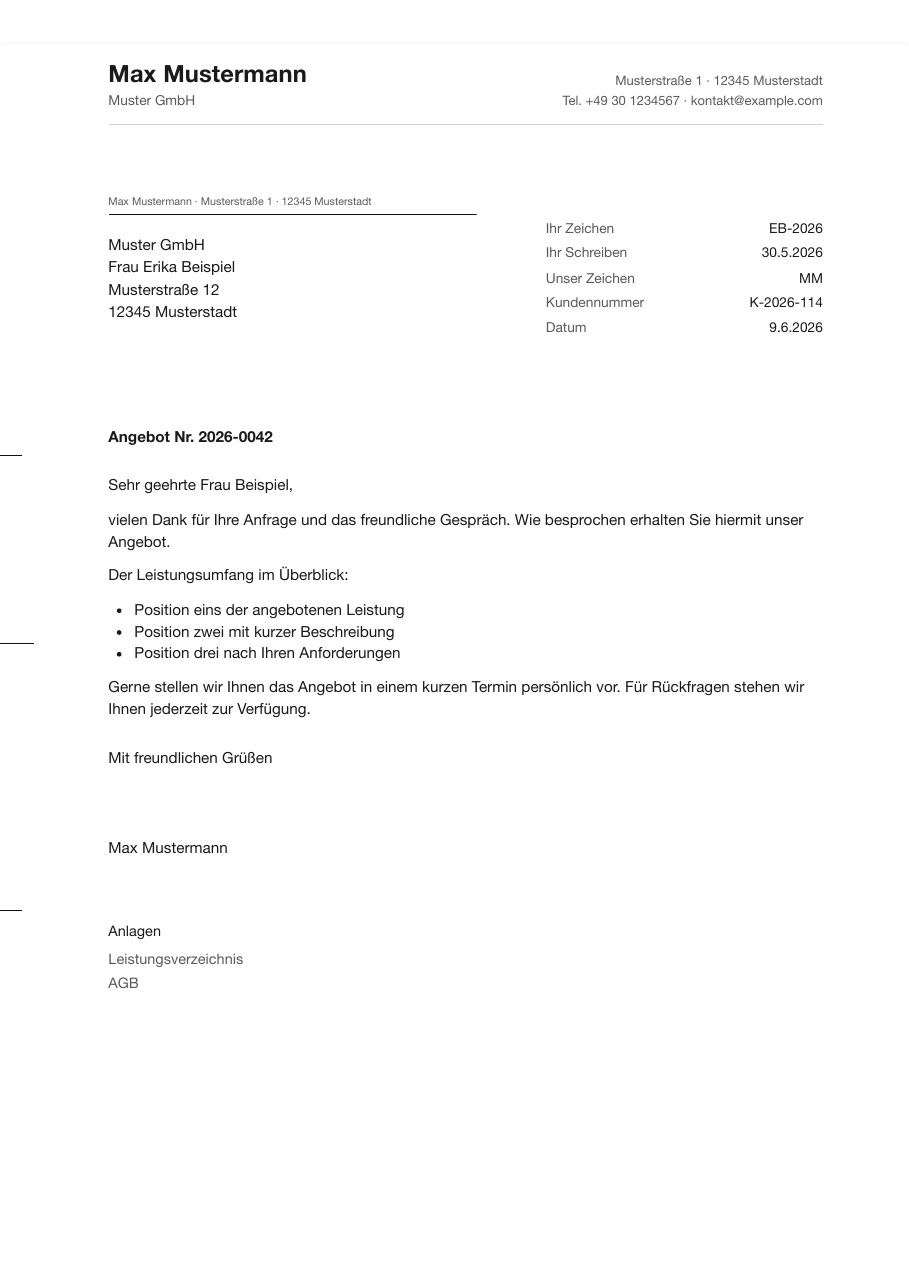
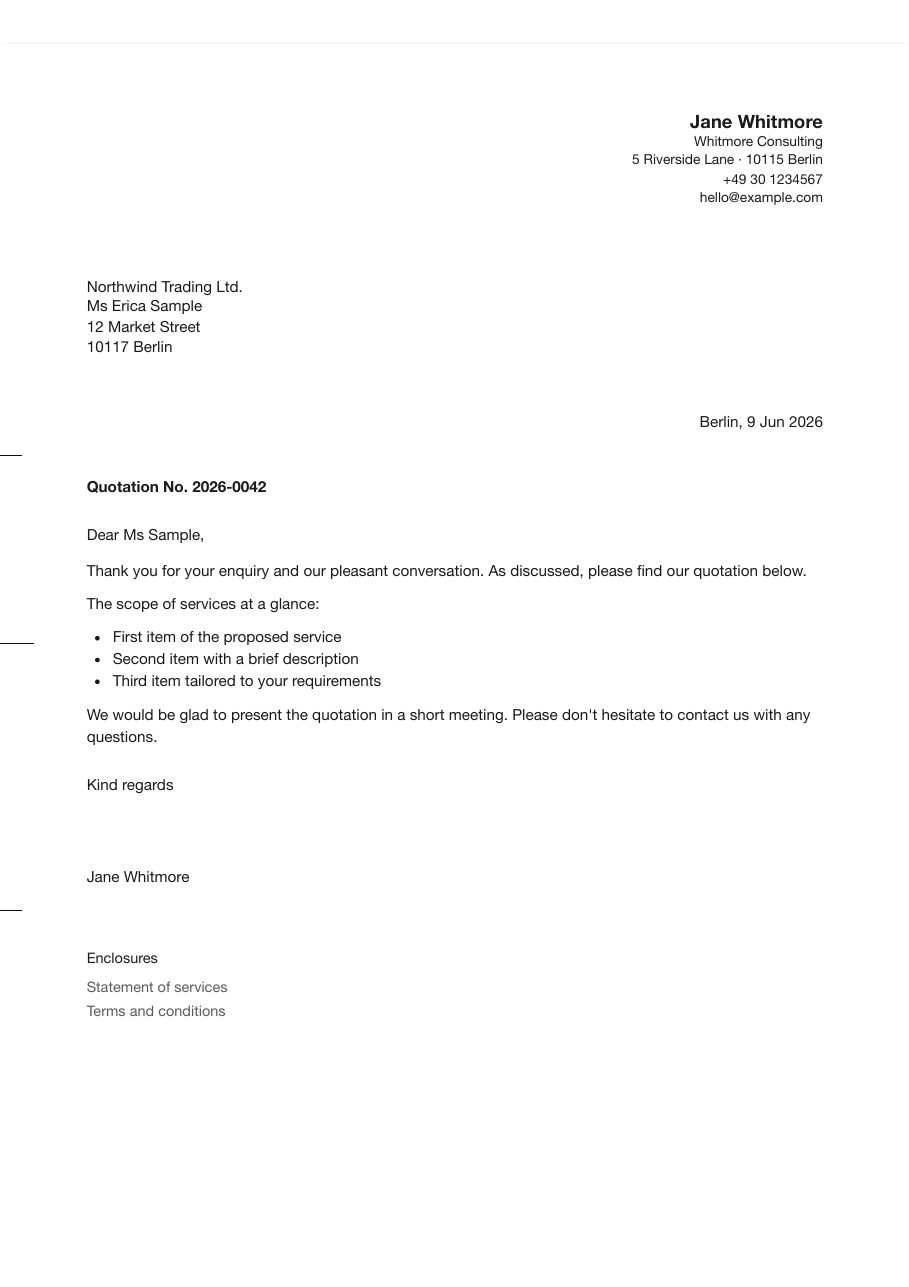
DIN 5008 (German) · Modern (English) — two layouts, two letter languages.
Features
- Letters from your notes: a note's frontmatter holds the metadata, the note body (Markdown) becomes the letter text — one command turns it into a finished, formatted business letter.
- PDF export & printing, everywhere: Desktop (macOS/Windows/Linux) → OS print dialog → “Save as PDF”; iPhone/iPad → a real, text-selectable vector PDF generated inside the plugin and shared with one tap (system share sheet → “Save to Files” or send anywhere). The built-in PDF engine has no runtime dependencies and works fully offline — no network, no Electron, no Node — and renders rich letter bodies (tables, embedded images, code blocks, multi-page pagination), not just plain text. Anything it cannot represent is reported as a notice rather than silently dropped. Page margins are set automatically (page 1: 10 mm top, continuation pages: 25 mm, bottom: 20 mm) — DIN positions stay paper-exact. The mobile PDF uses the standard PDF typefaces (Helvetica/Times/Courier), so files stay tiny and open identically in any viewer.
- Two layouts:
DIN 5008(German standard, ready for a window envelope) andModern(international) — choose in Settings → Layout. - Three styles via dropdown: matter-of-fact (sans), classic (serif), technical (monospaced accents) — plus a full info block or a plain date line; both overridable per letter in frontmatter.
- Bilingual: the plugin UI follows the Obsidian app language (English/German); the letter language is a separate setting — German or English letter labels (Anlagen/Enclosures, Ihr Zeichen/Your ref., …), switchable per letter via the
sprachefrontmatter field. - Metadata from frontmatter: recipient and sender as YAML lists, subject, salutation, closing, date, info block (incl. tax number + free-form rows), enclosures — German and English field aliases. The command Insert letter frontmatter into note scaffolds the fields; the settings tab shows a field reference.
- Sender profile in the settings, overridable per letter (list
absender/senderor individual fields). - Paginated preview: shows the final A4 sheets including page breaks.
- DIN extras: fold marks (105/210 mm or 87/192 mm), hole mark (148.5 mm), print-offset fine-tuning for the envelope window.
- No CSS required — style and info line are plain settings; for fine-tuning there are documented CSS design tokens + a one-click commented preset.
- Fully offline — no network calls, no telemetry; rendering happens locally via the OS print engine.
- TypeScript, esbuild-bundled, no runtime dependencies, mobile-ready (
isDesktopOnly: false), AGPL-3.0.
Requirements
- Obsidian 1.8.7 or newer (desktop and mobile — the plugin is not desktop-only).
- Desktop: macOS, Windows or Linux. Export goes through the operating system's print dialog.
- iPhone/iPad: iOS/iPadOS. Export produces a vector PDF inside the plugin and hands it to the system share sheet.
- Nothing else. No runtime dependencies, no network access, no Node or Electron APIs — the plugin works fully offline.
- For building from source: Node.js and npm (see Development).
Install
Repository: github.com/johannes-kaindl/obsidian-letterhead (source mirror: codeberg.org/jkaindl/obsidian-letterhead)
From Obsidian (recommended)
- Open Settings → Community plugins → Browse.
- Search for "Letterhead" and select Install.
- Enable Letterhead, then fill in your sender profile in the settings.
Manual install
# Copy the plugin into your vault
cp manifest.json main.js styles.css versions.json \
   "<your-vault>/.obsidian/plugins/letterhead/"

# …or, with OBSIDIAN_PLUGIN_DIR exported:
npm run deploy
Then: Obsidian → Settings → Community plugins → reload → enable Letterhead → fill in your sender profile.
Usage
- Open a note and scaffold the fields with Insert letter frontmatter into note (or see the example), then fill them in.
- Run Export letter as PDF / print (command palette or the envelope ribbon icon). Use Open letter preview for a paginated preview first.
- Desktop: In the print dialog choose Save as PDF (macOS: PDF dropdown bottom-left); keep scaling at 100%. iPhone/iPad: the finished PDF is saved to your Output target and, where that target is share directly, handed to the system share sheet — tap Save to Files or send it anywhere.
The note body below the frontmatter is the letter text and is rendered as Markdown.
Configuration
Everything is configured in Settings → Letterhead; nothing requires CSS. The essentials:
| Group | What you set there |
|---|---|
| Layout & style | DIN 5008 or Modern; one of three styles (matter-of-fact / classic / technical); full info block or plain date line; DIN form A (27 mm) or B (45 mm). |
| Sender profile | Name, addition, street, postcode/city, phone, email, web — plus the return-address line for the envelope window. Every field is overridable per letter in the frontmatter. |
| Elements | Fold marks, hole mark, print offset (shifts the content down if the address sits too high in the window), logo instead of the sender name. |
| Typography & language | Font and font size overrides, date locale, letter language (German or English printed labels — separate from the plugin's UI language), default closing. |
| Advanced | Output target, filename scheme, custom CSS. |
Two settings decide where your PDF ends up and what it is called:
- Output target — where the exported PDF is written: next to the note, into Obsidian's attachment folder, into a folder of your choice, or not saved at all and shared directly. An existing file is never overwritten; a
" (2)"is appended instead. Applies to the vector PDF export, not to the desktop print dialog. - Filename scheme — the name of the exported PDF, and the one the print dialog proposes. Placeholders
{notiz}{datum}{datum_lang}{empfaenger}{betreff}{unserzeichen}; anything else in the field is kept literally.{datum}yields YYYY-MM-DD so letters sort chronologically in a file manager,{datum_lang}prints the date as it appears in the letter.
Existing installations keep their previous behaviour (share directly, {notiz}); only fresh installations start with the new defaults. Full reference: docs/reference/settings.md.
How it works
A letter is an ordinary note. Its frontmatter carries the metadata (recipient, subject, salutation, closing, enclosures, …) and the note body is the letter text, rendered as Markdown. Field names exist as German and English aliases, so subject: and betreff: are the same field.
Export then takes one of two deliberately different routes:
- Desktop renders the letter as HTML/CSS into an isolated iframe and hands it to the operating system's print dialog — where you choose "Save as PDF". The OS does the rendering, so the result matches what any other application on your machine would print.
- iPhone/iPad cannot print this way, so the plugin builds the PDF itself: a real, text-selectable vector PDF (PDF 1.7, standard PDF typefaces), generated on device and passed to the share sheet with one tap. Tables, embedded images, code blocks and multi-page pagination are rendered directly into the PDF. Anything the engine cannot represent is reported as a notice rather than silently dropped.
Both routes share the same geometry. DIN 5008 positions — address field, fold marks at 105/210 mm (or 87/192 mm), hole mark at 148.5 mm — are placed as absolute paper coordinates so the recipient address lines up with a window envelope. Print margins are set automatically (page 1: 10 mm top, continuation pages: 25 mm, 20 mm bottom).
Documentation
- Tutorial — your first letter
- Reference — frontmatter fields · settings · theming / CSS tokens
- Explanation — DIN 5008 measurements
Theming
Pick a style and info-line mode directly in the settings — no CSS required. For fine-tuning beyond that, the look is driven entirely by CSS custom properties (design tokens): the Custom CSS field (Settings → Advanced) comes pre-filled with a fully commented-out preset — uncomment a line and adjust it; the Reset preset button restores that initial state, or you can copy presets/letterhead-theme.css. Geometry tokens marked DIN-critical keep the address block aligned with the envelope window — change them deliberately. Full token list: docs/reference/theming.md.
Development
TypeScript, bundled to main.js with esbuild. main.js is build output (gitignored, not committed) — install dependencies once, then build and deploy into your vault.
npm install
npm run build     # typecheck + esbuild → main.js
npm test          # vitest
npm run gate      # typecheck + test + check:pure + build
npm run deploy    # build, then copy manifest.json main.js styles.css versions.json → $OBSIDIAN_PLUGIN_DIR
See AGENTS.md for the full architecture notes and remaining deliberate deviations from the workspace ts-node · obsidian-plugin profile.
Privacy & security
Letterhead runs entirely on your device: no network calls, no telemetry, no tracking. The source is TypeScript in src/, readable and auditable; main.js itself is build output, not a committed file. The only btoa() call embeds your configured logo as an inline data: URL. Releases are cryptographically signed with a Sigstore/SLSA build-provenance attestation, built fresh from the tagged source by GitHub Actions — confirm the main.js you run came from this source with gh attestation verify main.js --repo johannes-kaindl/obsidian-letterhead. Full statement and how to report a vulnerability: SECURITY.md.
License
Code: AGPL-3.0-or-later — see LICENSE; commercial dual-license option in LICENSING.md.
Documentation/text: CC BY-SA 4.0 — see LICENSE-DOCS.