| .github/workflows | ||
| assets | ||
| .gitignore | ||
| calendar.ts | ||
| calendar.verify.mjs | ||
| CHANGELOG.md | ||
| embed.ts | ||
| embed.verify.mjs | ||
| esbuild.config.mjs | ||
| eslint.config.mts | ||
| integrity.ts | ||
| integrity.verify.mjs | ||
| LICENSE | ||
| main.ts | ||
| manifest.json | ||
| masterplan.md | ||
| package-lock.json | ||
| package.json | ||
| README.md | ||
| release.verify.mjs | ||
| styles.css | ||
| tsconfig.json | ||
| version-bump.mjs | ||
| versions.json | ||

Writing Activity Calendar
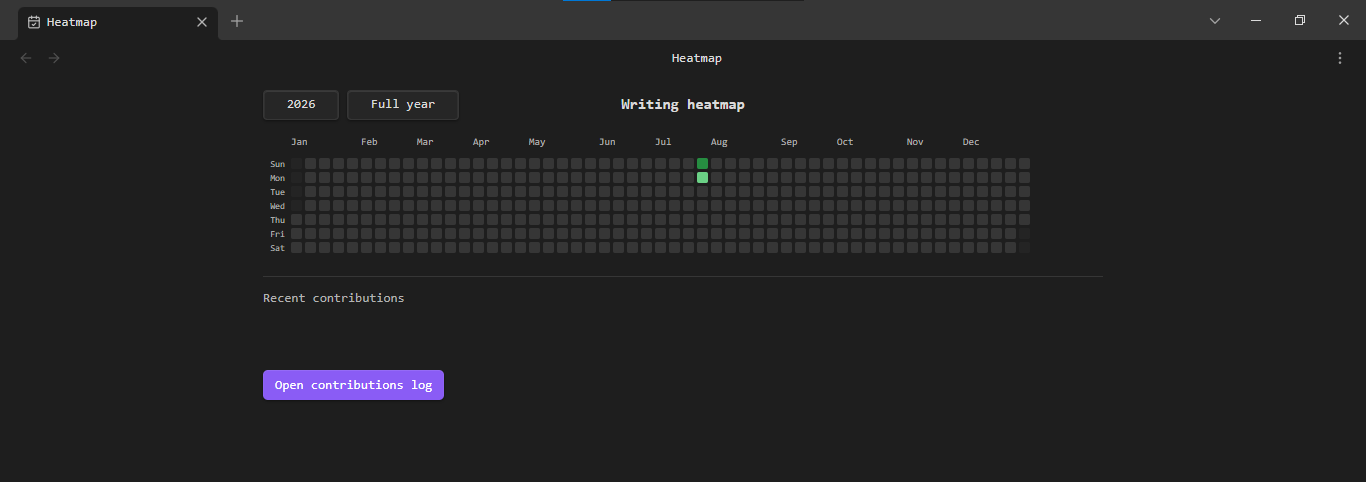
Writing Activity Calendar records net words written across Markdown files in an Obsidian vault and displays the result in a GitHub-style yearly calendar.
Features
- A real calendar with correct weekday and month alignment
- Sunday-first or Monday-first weeks, configurable in Settings
- All seven weekday labels remain visible during horizontal scrolling
- Year selection from the plugin's 2026 release year through the current year
- Full-year, current-month, and current-week display modes
- One contribution for each 100 net words written in a calendar day
- Four automatically scaled intensity levels with a customizable base color
- A local contribution log with note, heading, preview, and timestamp context
- Confirmed deletion of narrative log entries without changing daily calendar totals
- Local record validation and SHA-256 tamper detection
- A
heatmapcode block for embedding a selected year in a note - A Settings generator for full-year and selected-month embed code
- Desktop and mobile-compatible Obsidian APIs
- A centered, responsive full-view layout
Contribution calculation
Writing and deletion are balanced within the same local calendar day. Negative balances do not carry into the next day.
Delete 200 words       -> net -200 -> 0 contributions
Write 250 words        -> net +50  -> 0 contributions
Write 75 more words    -> net +125 -> 1 contribution
Write 75 more words    -> net +200 -> 2 contributions
The displayed value is max(0, floor(net words / 100)).
Usage
Open Writing Activity Calendar from the ribbon or run Writing Activity Calendar: Open heatmap from the command palette.
To embed a year inside a note, run Writing Activity Calendar: Insert heatmap embed, or add:
```heatmap
year: 2026
```
To embed one month from a selected year, add month: 1 through month: 12:
```heatmap
year: 2026
month: 7
```
Settings also includes an embed generator where you can choose the range, year, and month, preview the code, and copy it.
Installation
Community plugins
- Open Settings -> Community plugins in Obsidian.
- Select Browse and search for Writing Activity Calendar.
- Install and enable the plugin.
Manual installation
- Download
main.js,manifest.json, andstyles.cssfrom a GitHub release. - Create
<vault>/.obsidian/plugins/writing-activity-calendar/. - Place the three downloaded files in that folder.
- Reload Obsidian, then enable Writing Activity Calendar under Settings -> Community plugins.
Privacy and data
- The plugin makes no network requests and includes no telemetry or advertising.
- To establish a baseline and calculate writing changes, the plugin enumerates Markdown files in the vault and temporarily reads their contents into memory.
- The plugin writes the heatmap embed snippet to the system clipboard only when Copy embed code is selected; it never reads from the clipboard.
- Activity is stored in
<vault>/.obsidian/plugins/writing-activity-calendar/data.json. - Note contents are held temporarily in memory for word-difference calculation and are not duplicated in
data.json. - A vault-sync provider may copy
data.jsonwhen the.obsidianfolder is included in sync. - Contribution-log entries are read-only in the interface. The complete narrative log can be deleted from Settings or the full log window; daily calendar totals remain intact.
- Version 1.1.0 validates records and stores a SHA-256 checksum. If validation fails, tracking pauses until the user reviews the data and explicitly re-establishes the integrity baseline.
- The checksum detects unexpected local changes but is not proof against a vault owner who can modify both
data.jsonand the plugin code. Absolute offline unfalsifiability is not possible under that trust model. - To reset all plugin settings and calendar history, disable the plugin and remove its
data.jsonfile.
Limitations
- Changes made while Obsidian or the plugin is not running cannot be counted.
- The plugin counts whitespace-separated words; languages without whitespace word boundaries may be undercounted.
- Simultaneous edits from multiple devices can produce sync conflicts in plugin data.
- Restoring or merging
data.jsonoutside Obsidian can trigger the integrity warning and require review.
Development
Requires Node.js 18 or later.
npm install
npm run check
npm run dev
npm run check runs calendar, integrity, and embed verification, Obsidian-specific lint rules, TypeScript checking, the production build, and release validation.