mirror of
https://github.com/philips/supernote-obsidian-plugin.git
synced 2026-07-22 09:50:25 +00:00

94 lines
3.8 KiB
Markdown
94 lines
3.8 KiB
Markdown
# Supernote Obsidian Plugin
|
|
|
|
I use my Supernote for capturing hand written notes and reading documents.
|
|
|
|
But, I already use Obsidian for organizing and capturing all of my digital notes.
|
|
|
|
This plugin enables me (and now you!) to import handwritten notes into Obsidian and view them on a desktop, phone or tablet.
|
|
|
|
This plugin has three main features:
|
|
|
|
- 📝 View Supernote `*.note` files in your Obsidian Vault. You can link to these notes from your Markdown notes too `[My Note](example.note)`.
|
|
|
|
- ➡️ Export Supernote `*.note` files as PNGs and/or markdown files and attach them to your Vault.
|
|
|
|
- 📺 Copy an image from a Supernote via [screen mirroring](https://support.supernote.com/en_US/organizing-managing/1791924-screen-mirroring) into your current note with the "Insert Supernote mirror image" command ([demo video](https://youtu.be/Ih_NW-z_aLw))
|
|
|
|
**Video Demo**
|
|
|
|
[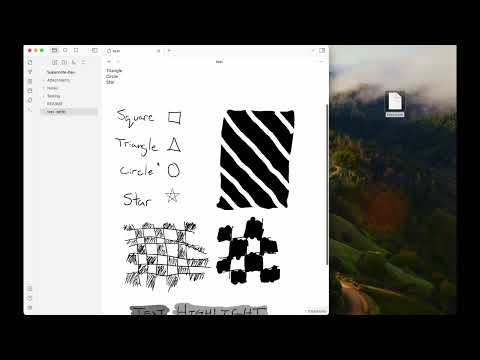](https://www.youtube.com/watch?v=tEoW35fYVew)
|
|
|
|
## Install via Community Plugin Store
|
|
|
|
This plugin is available via the [Obsidian Community Plugin Store](https://obsidian.md/plugins?id=supernote). Click the previous link or search for "Unofficial Supernote by Ratta Integration".
|
|
|
|
## Install via BRAT
|
|
|
|
To test Beta builds of this plugin follow these steps:
|
|
|
|
- Install the BRAT plugin via Community Plugin Search
|
|
- [Read the docs](https://tfthacker.com/BRAT)
|
|
- Add `https://github.com/philips/supernote-obsidian-plugin`
|
|
|
|
## Manually installing the plugin
|
|
|
|
- Copy over `main.js`, `manifest.json` to your vault `VaultFolder/.obsidian/plugins/obsidian-plugin-supernote/` from [https://github.com/philips/supernote-obsidian-plugin/releases](https://github.com/philips/supernote-obsidian-plugin)
|
|
|
|
## Known Issues
|
|
|
|
There are a handful of known issues. Please check the [issue list](https://github.com/philips/supernote-obsidian-plugin/issues). If you don't see a matching issue please [create a new issue](https://github.com/philips/supernote-obsidian-plugin/issues)?
|
|
|
|
## Roadmap / Ideas
|
|
|
|
- 🔗 Note linking
|
|
- 🎛️ Settings panel to control file layout, linking, and more
|
|
|
|
## Thank You
|
|
|
|
Thank you to [Tiemen Schuijbroek](https://gitlab.com/Tiemen/supernote) for developing the initial supernote Typescript library I forked.
|
|
|
|
## FAQ
|
|
|
|
**Q** Why isn't there a table of contents in the generated Markdown file?
|
|
|
|
**A** Because the [Obsidian Outline](https://help.obsidian.md/Plugins/Outline) sidebar accomplishes this same feature.
|
|
|
|
**Q** Can the images be larger or smaller?
|
|
|
|
**A** Add a number, in pixels, after a `|` in the link like `![[20240419_100426-0.png|100]]`. [See Obsidian docs](https://help.obsidian.md/Linking+notes+and+files/Embed+files#Embed+an+image+in+a+note). Also, you can use the mouse wheel zoom plugin suggested below to make this easier.
|
|
|
|
## Other Helpful Plugins
|
|
|
|
These are not endorsements but might be useful to pair with this plugin.
|
|
|
|
- [Mousewheel Image Zoom](https://obsidian.md/plugins?id=mousewheel-image-zoom)
|
|
- [Image Toolkit](https://obsidian.md/plugins?id=obsidian-image-toolkit)
|
|
|
|
## Relevant Resources
|
|
|
|
- [Obsidian and Supernote by Organizing for Change](https://www.youtube.com/watch?v=2zKD79e-V_U)
|
|
- [E-Ink notes in Obsidian / Notion? by Brandon Boswell](https://www.youtube.com/watch?v=kW8I8B-eCRk)
|
|
- [Academic HANDWRITTEN notes in OBSIDIAN ft. Supernote by pixel leaves](https://www.youtube.com/watch?v=lzYCPkVnqIM)
|
|
|
|
## Funding
|
|
|
|
I personally don't accept funding or donations for this project. However, if you feel inclined, consider donating to the [Signal Foundation](https://signal.org/donate/).
|
|
|
|
## Developer Notes
|
|
|
|
- Make sure your NodeJS is at least v16 (`node --version`).
|
|
- Clone this repo.
|
|
- Setup the deps
|
|
|
|
```
|
|
git submodule init
|
|
git submodule update
|
|
cd supernote-typescript/
|
|
npm run build
|
|
npm link
|
|
cd ..
|
|
npm link supernote-typescript/
|
|
```
|
|
|
|
- `npm i` or `yarn` to install dependencies.
|
|
- `npm run dev` to start compilation in watch mode.
|