mirror of
https://github.com/rait-09/obsidian-agent-client.git
synced 2026-07-22 06:43:37 +00:00

125 lines
4.9 KiB
Markdown
125 lines
4.9 KiB
Markdown
<h1 align="center">Agent Client Plugin for Obsidian</h1>
|
|
|
|
<p align="center">
|
|
<img src="https://img.shields.io/github/downloads/RAIT-09/obsidian-agent-client/total" alt="GitHub Downloads">
|
|
<img src="https://img.shields.io/github/license/RAIT-09/obsidian-agent-client" alt="License">
|
|
<img src="https://img.shields.io/github/v/release/RAIT-09/obsidian-agent-client" alt="GitHub release">
|
|
<img src="https://img.shields.io/github/last-commit/RAIT-09/obsidian-agent-client" alt="GitHub last commit">
|
|
<a href="https://github.com/RAIT-09/obsidian-agent-client/discussions"><img src="https://img.shields.io/github/discussions/RAIT-09/obsidian-agent-client" alt="GitHub Discussions"></a>
|
|
</p>
|
|
|
|
<p align="center">
|
|
<a href="README.ja.md">日本語はこちら</a>
|
|
</p>
|
|
|
|
<p align="center">
|
|
<a href="https://community.obsidian.md/plugins/agent-client" target="_blank"><img src="https://img.shields.io/badge/Add%20to%20Obsidian-7c3aed?logo=obsidian&logoColor=white&style=for-the-badge" alt="Add to Obsidian"></a>
|
|
</p>
|
|
|
|
<p align="center">
|
|
<a href="https://www.buymeacoffee.com/rait09" target="_blank"><img src="https://cdn.buymeacoffee.com/buttons/v2/default-yellow.png" alt="Buy Me A Coffee" width="180" height="50" ></a>
|
|
</p>
|
|
|
|
Bring AI agents (Claude Code, Codex, Gemini CLI) directly into Obsidian. Chat with your AI assistant right from your vault.
|
|
|
|
Built on [Agent Client Protocol (ACP)](https://github.com/agentclientprotocol/agent-client-protocol) by Zed.
|
|
|
|
https://github.com/user-attachments/assets/1c538349-b3fb-44dd-a163-7331cbca7824
|
|
|
|
## Features
|
|
|
|
- **Note Mentions**: Reference your notes with `@notename` syntax
|
|
- **Image Attachments**: Paste or drag-and-drop images into the chat
|
|
- **Slash Commands**: Use `/` commands provided by your agent
|
|
- **Multi-Agent Support**: Switch between Claude Code, Codex, Gemini CLI, and custom agents
|
|
- **Multi-Session**: Run multiple agents simultaneously in separate views
|
|
- **Floating Chat**: A persistent, collapsible chat window for quick access
|
|
- **Mode & Model Switching**: Change AI models and agent modes from the chat
|
|
- **Session History**: Resume or fork previous conversations
|
|
- **Chat Export**: Save conversations as Markdown notes
|
|
- **Terminal Integration**: Let agents execute commands and return results
|
|
- **MCP Support**: Agents use their configured MCP servers — no extra setup needed in the plugin
|
|
|
|
## Installation
|
|
|
|
### From Community Plugins (Recommended)
|
|
|
|
1. Open **Settings → Community Plugins → Browse**
|
|
2. Search for **"Agent Client"**
|
|
3. Click **Install**, then **Enable**
|
|
|
|
### Via BRAT (Pre-release Versions)
|
|
|
|
To try pre-release versions before they are published to Community Plugins:
|
|
|
|
1. Install the [BRAT](https://github.com/TfTHacker/obsidian42-brat) plugin
|
|
2. Go to **Settings → BRAT → Add Beta Plugin**
|
|
3. Paste: `https://github.com/RAIT-09/obsidian-agent-client`
|
|
4. Enable **Agent Client** from the plugin list
|
|
|
|
### Manual Installation
|
|
|
|
1. Download `main.js`, `manifest.json`, `styles.css` from [Releases](https://github.com/RAIT-09/obsidian-agent-client/releases)
|
|
2. Place them in `VaultFolder/.obsidian/plugins/agent-client/`
|
|
3. Enable the plugin in **Settings → Community Plugins**
|
|
|
|
## Quick Start
|
|
|
|
Open a terminal (Terminal on macOS/Linux, PowerShell on Windows) and run the following commands.
|
|
|
|
1. **Install an agent and its ACP adapter** (e.g., Claude Code):
|
|
```bash
|
|
curl -fsSL https://claude.ai/install.sh | bash # Install Claude Code
|
|
npm install -g @agentclientprotocol/claude-agent-acp # Install ACP adapter
|
|
```
|
|
|
|
2. **Login** (skip if using API key):
|
|
```bash
|
|
claude
|
|
```
|
|
Follow the prompts to authenticate with your Anthropic account.
|
|
|
|
3. **Find the paths**:
|
|
```bash
|
|
which node # macOS/Linux
|
|
which claude-agent-acp
|
|
|
|
where.exe node # Windows
|
|
where.exe claude-agent-acp
|
|
```
|
|
|
|
4. **Configure** in **Settings → Agent Client**:
|
|
- **Node.js path**: e.g., `/usr/local/bin/node`
|
|
- **Built-in agents → Claude Code → Path**: e.g., `/usr/local/bin/claude-agent-acp` (not `claude`)
|
|
- **API key**: Add your key, or leave empty if logged in via CLI
|
|
|
|
5. **Start chatting**: Click the robot icon in the ribbon
|
|
|
|
### Setup Guides
|
|
|
|
- [Claude Code](https://rait-09.github.io/obsidian-agent-client/agent-setup/claude-code.html)
|
|
- [Codex](https://rait-09.github.io/obsidian-agent-client/agent-setup/codex.html)
|
|
- [Gemini CLI](https://rait-09.github.io/obsidian-agent-client/agent-setup/gemini-cli.html)
|
|
- [Custom Agents](https://rait-09.github.io/obsidian-agent-client/agent-setup/custom-agents.html) (OpenCode, Qwen Code, Kiro, Mistral Vibe, etc.)
|
|
|
|
**[Full Documentation](https://rait-09.github.io/obsidian-agent-client/)**
|
|
|
|
## Development
|
|
|
|
```bash
|
|
npm install
|
|
npm run dev
|
|
```
|
|
|
|
For production builds:
|
|
```bash
|
|
npm run build
|
|
```
|
|
|
|
## License
|
|
|
|
Apache License 2.0 - see [LICENSE](LICENSE) for details.
|
|
|
|
## Star History
|
|
|
|
[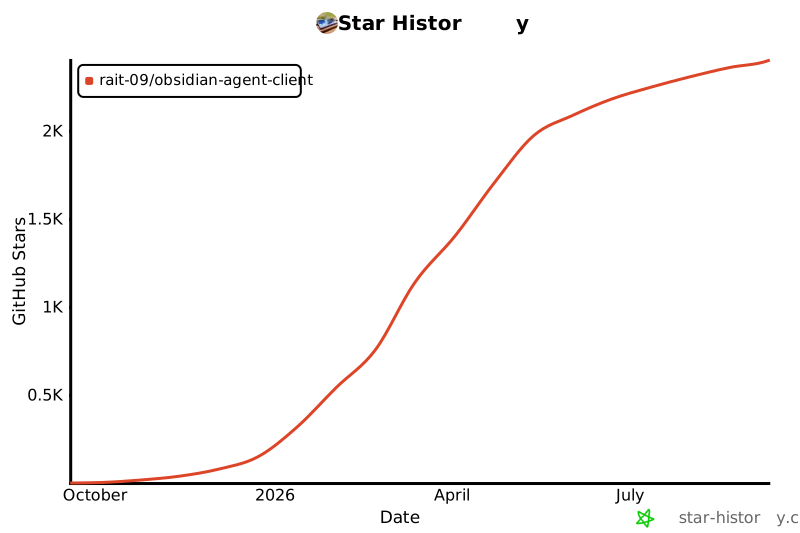](https://www.star-history.com/#RAIT-09/obsidian-agent-client&Date)
|