mirror of
https://github.com/raven-pensieve/obsidian-ace-code-editor.git
synced 2026-07-22 05:48:56 +00:00

54 lines
1.8 KiB
Markdown
54 lines
1.8 KiB
Markdown
中文 | [English](https://github.com/Raven-Pensieve/obsidian-ace-code-editor/blob/master/README.md)
|
||
|
||
# ACE 代码编辑器
|
||
|
||
一个基于 Ace 编辑器增强的代码编辑器,提供语法高亮、代码折叠等高级编辑功能。
|
||
|
||
|
||
|
||
## 功能介绍
|
||
|
||
- 在 obsidian 中直接进行代码编辑
|
||

|
||
|
||
- 管理 css 代码片段
|
||

|
||
|
||
- 编辑代码块
|
||

|
||
|
||
- 代码文件预览
|
||

|
||
|
||
## 安装
|
||
|
||
### 社区插件市场安装
|
||
|
||
[点击安装](obsidian://show-plugin?id=ace-code-editor),或按以下步骤操作:
|
||
|
||
1. 打开 Obsidian 并前往 `设置 > 第三方插件`。
|
||
2. 搜索 “Ace Code Editor”。
|
||
3. 点击 “安装”。
|
||
|
||
### BRAT(推荐给测试用户)
|
||
|
||
1. 安装 [BRAT](https://github.com/TfTHacker/obsidian42-brat) 插件
|
||
2. 在 BRAT 设置中点击"添加测试插件"
|
||
3. 输入 `Raven-Pensieve/obsidian-ace-code-editor`
|
||
4. 启用插件
|
||
|
||
## 许可证
|
||
|
||
此项目基于 GPL-3.0 LICENSE 许可 - 详情请参阅 [LICENSE](LICENSE) 文件。
|
||
|
||
## 致谢
|
||
|
||
本项目参考或使用了以下项目的代码和想法:
|
||
|
||
- [Ace Editor](https://github.com/ajaxorg/ace)
|
||
- [TextMate Themes](https://github.com/filmgirl/TextMate-Themes)
|
||
- [Obsidian Import Code](https://github.com/yu4n2h1/obsidian-import-code)
|
||
|
||
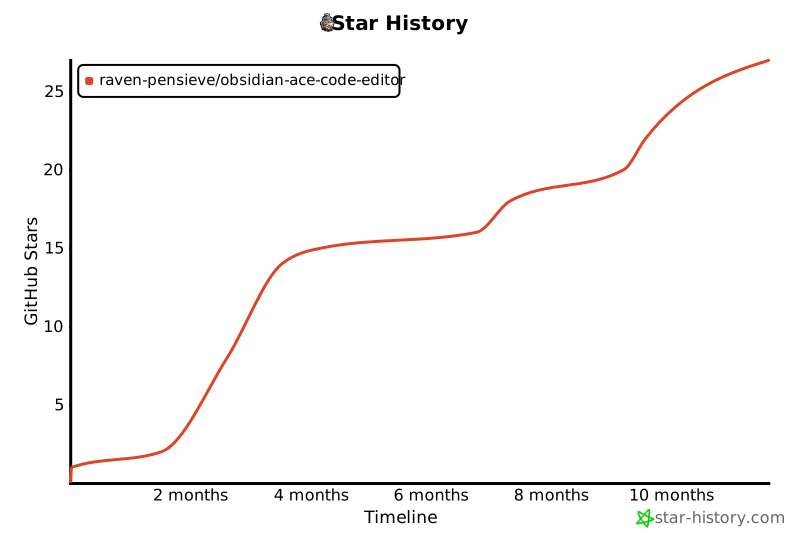
## Star 历史
|
||
|
||
[](https://www.star-history.com/#Raven-Pensieve/obsidian-ace-code-editor&Timeline)
|