mirror of
https://github.com/red0orange/obsidian-webdav-file-explorer.git
synced 2026-07-22 08:20:27 +00:00
No description
| docker | ||
| refers | ||
| src | ||
| .editorconfig | ||
| .eslintignore | ||
| .eslintrc | ||
| .gitignore | ||
| .npmrc | ||
| esbuild.config.mjs | ||
| LICENSE | ||
| manifest.json | ||
| package-lock.json | ||
| package.json | ||
| README.md | ||
| styles.css | ||
| tsconfig.json | ||
| version-bump.mjs | ||
| versions.json | ||

Obsidian Webdav File Explorer Plugin
Requirements: We often need to save some of the files specialized in each software, it is not convenient to Obsidian management. For example, compressed packages, videos, pptx documents and so on.
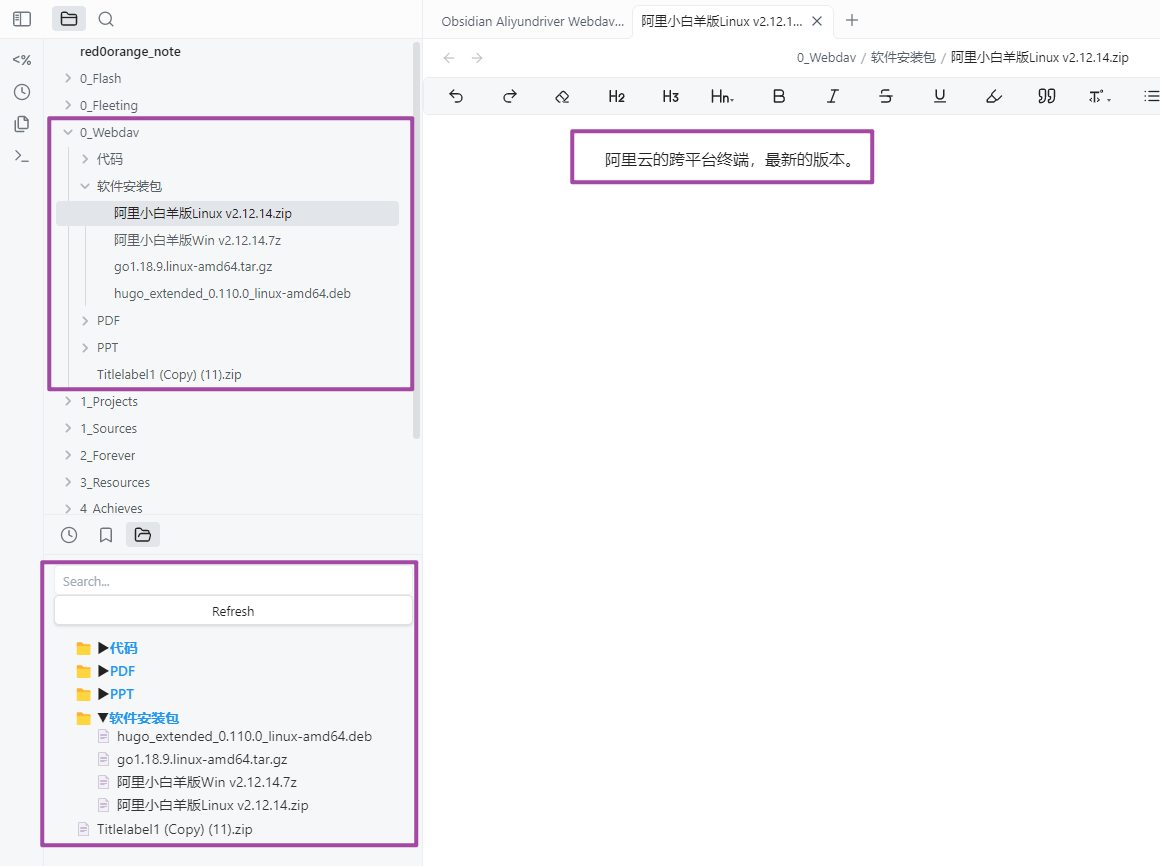
Solution: The plugin supports you to save files in any Webdav access support network disk or cloud storage. The plugin provides browsing and referencing of these files. The plugin will read the files within Webdav and display them in the form of a file tree. On the other hand, the plugin creates fully symmetric md file trees in the local path. In the corresponding md file you can provide a description of the file for subsequent retrieval. As shown in the figure below.
Usage:
- Install and enable the plugin.
- Set your Webdav file path at the plugin settings. Where "remote dir" is the specified root path, or empty if it is the entire root directory. Where "root folder path" is the local root directory for creating symmetric md files for each folder.
Thanks: