mirror of
https://github.com/weiya9511/weiya-obsidian-theme.git
synced 2026-07-22 05:00:26 +00:00
No description
| screenshots | ||
| LICENSE | ||
| manifest.json | ||
| README.md | ||
| screenshot.png | ||
| theme.css | ||


WeiYa
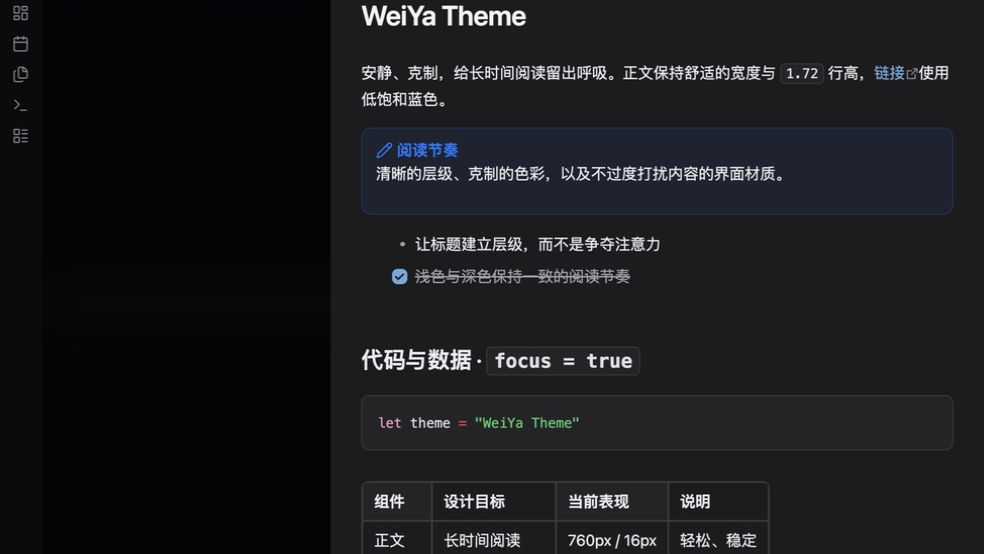
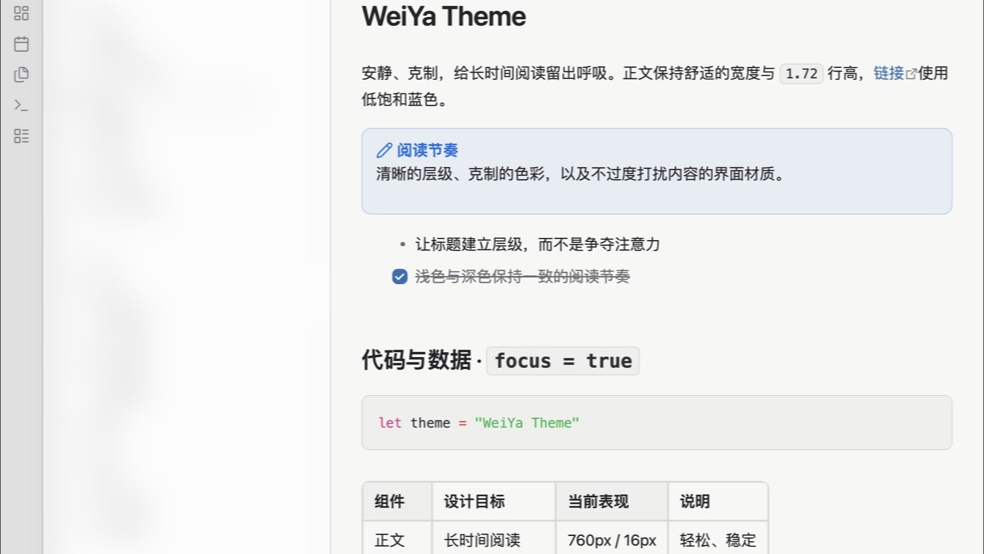
一款安静、克制、适合长时间阅读的 Obsidian 主题,视觉取向接近 macOS 原生界面。
A quiet, restrained Obsidian theme designed for long reading sessions, with a macOS-inspired visual direction.
中文
特点
- 同时支持浅色与深色模式。
- 优先覆盖 Obsidian 官方语义 CSS 变量。
- 正文宽度、字号与行高针对长时间阅读调整。
- 覆盖标题、链接、列表、Callout、代码块、表格和侧边栏。
- 桌面端侧边栏使用低透明材质;移动端自动降级为实色。
- 不加载远程字体、图片、脚本或其他外部资源。
从社区主题安装
- 打开 Obsidian 的“设置”。
- 进入“外观”→“主题”→“管理”。
- 搜索
WeiYa,点击“安装并使用”。
手动安装
- 下载 Release 中的
manifest.json和theme.css。 - 在知识库中创建
.obsidian/themes/WeiYa/。 - 将两个文件放入该目录。
- 重启或重新加载 Obsidian,然后在“设置”→“外观”中选择
WeiYa。
兼容性
- 最低 Obsidian 版本:
1.9.0。 - 已在 macOS 上的 Obsidian
1.12.7验证浅色、深色与窄窗口表现。 - 主题包含移动端安全降级规则;iPhone 与 iPad 实机表现尚未完成正式验证。
设计原则
WeiYa 保持低选择器复杂度,以官方变量为主,只为阅读间距、Callout、代码块、表格和侧边栏补充必要样式。主题不隶属于 Apple 或 Obsidian 官方。
反馈
如遇到可复现的问题,请在本仓库的 Issues 页面提交 Obsidian 版本、操作系统、复现步骤和截图。
English
Features
- Light and dark appearances.
- Official Obsidian semantic CSS variables first.
- Reading-focused content width, typography, and line height.
- Styling for headings, links, lists, callouts, code, tables, and sidebars.
- Subtle translucent sidebars on desktop with a solid mobile fallback.
- No remote fonts, images, scripts, or external resources.
Install from Community Themes
- Open Obsidian Settings.
- Go to Appearance → Themes → Manage.
- Search for
WeiYa, then select Install and use.
Manual installation
- Download
manifest.jsonandtheme.cssfrom the latest Release. - Create
.obsidian/themes/WeiYa/inside your vault. - Place both files in that folder.
- Reload Obsidian and select
WeiYaunder Settings → Appearance.
Compatibility
- Minimum Obsidian version:
1.9.0. - Light, dark, and narrow-window layouts verified with Obsidian
1.12.7on macOS. - Mobile-safe fallback rules are included; formal iPhone and iPad device testing is still pending.
Design principles
WeiYa keeps selector complexity low, prioritizes official variables, and adds only focused styles for reading rhythm, callouts, code, tables, and sidebars. This project is not affiliated with Apple or Obsidian.
Feedback
For reproducible issues, please use this repository's Issues page and include your Obsidian version, operating system, reproduction steps, and screenshots.
License
MIT © 2026 WeiYa